Why Google My Business GMB Optimization Is the Highest-ROI Move for Local Businesses
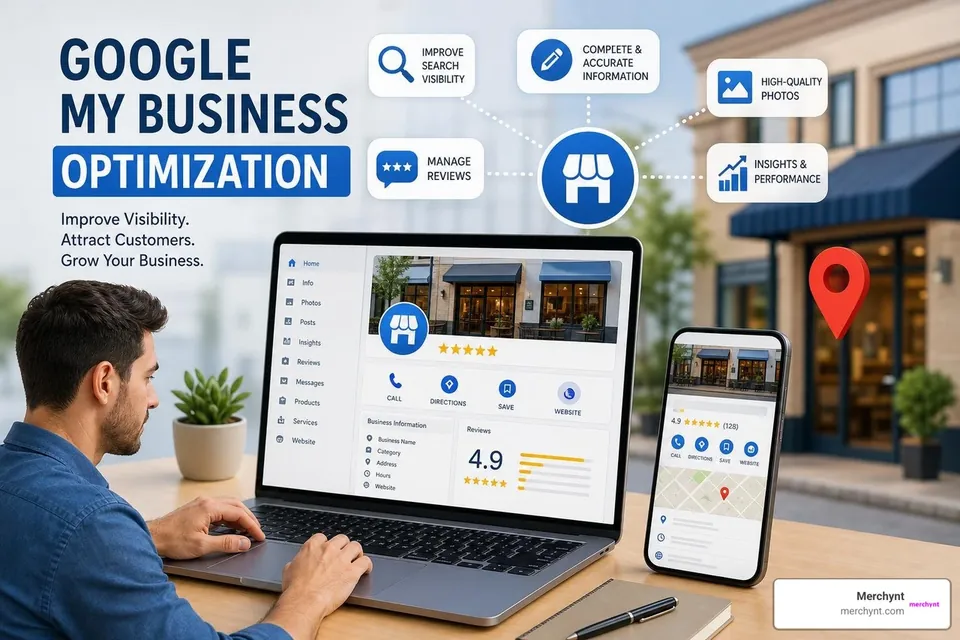
Google My Business GMB optimization is the process of completing, refining, and actively managing your Google Business Profile (GBP) so your business ranks higher in Google Search and Google Maps — and converts more searchers into paying customers.
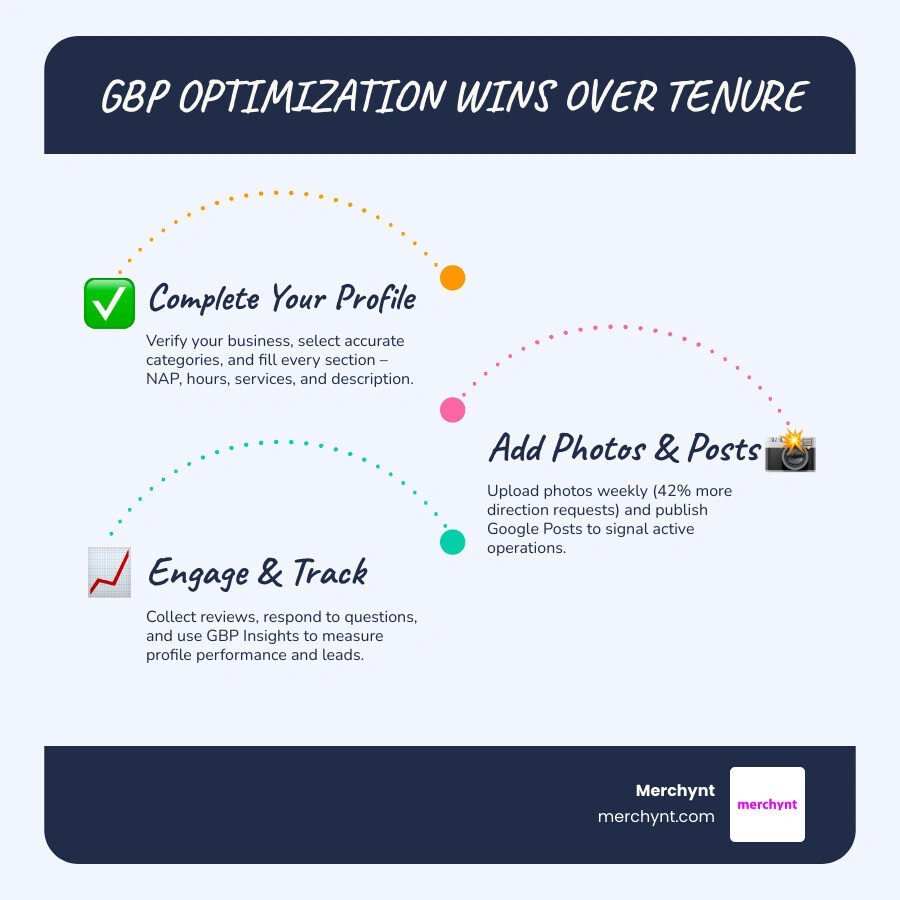
If you want a quick answer, here is what GBP optimization actually involves:
- Claim and verify your Google Business Profile
- Choose the right primary and secondary categories for your business type
- Complete every section — business name, address, phone, hours, services, description
- Upload photos consistently — businesses with photos get 42% more direction requests
- Collect and respond to reviews — velocity, recency, and keywords all matter
- Publish Google Posts weekly to signal active operations
- Seed your Q&A section with common customer questions
- Track performance using GBP Insights, UTM tags, and call tracking
More than 85% of Google search pages show localized results — including the Local Pack and map. If your profile is incomplete or neglected, a competitor with a better-optimized profile will take your customers, even if you have been in business longer or have more reviews.
Consider this: a three-year-old plumbing company with 61 photos, detailed service entries, and twice-weekly posts outranked an eleven-year-old competitor with 94 reviews. Optimization beats tenure, every time.
I'm Justin Silverman, founder of Merchynt, where I've spent years helping over 10,000 small businesses and agencies master Google My Business GMB optimization — first through hands-on services, and now through Paige, the world's first fully automated local SEO AI platform. Let's walk through exactly how to do this right.
Know your google my business gmb optimization terms:
The Core Pillars of Google My Business GMB Optimization
To win at local search, we must first understand how Google decided who gets the spotlight. Google's algorithm does not play favorites based on who has the deepest pockets. In fact, Google explicitly states that there is no way to request or pay for a better local ranking.
Instead, Google's local algorithm relies on three core pillars:
- Relevance: How well your profile matches what someone is searching for. If someone searches for "organic dog food," and your profile is completely filled out with detailed product lists and descriptions, Google knows you are a perfect match.
- Distance: How far your business is from the searcher. If a user does not share their location, Google estimates their location based on other signals to calculate distance.
- Prominence: How well-known or authoritative your business is. Google measures this using signals from across the web, including links, articles, directory listings, and your overall review profile.
In July 2026, prominence has expanded to include AI-driven search layers. Google's AI Overviews now pull data directly from Google Business Profiles to answer complex, intent-based queries. If your profile is incomplete, you are completely excluded from these AI-generated answers.
For a deeper dive into these ranking factors, check out the official Tips to improve your local ranking on Google - Google Business Profile Help and our comprehensive Google Business Ranking Guide 2026.
Setting Up and Verifying Your Profile Foundation
Before we can optimize, we must secure the foundation. This starts with claiming your listing and ensuring absolute NAP (Name, Address, Phone) consistency across the web. Google cross-references your profile against other directories; major inconsistencies act as a red flag that can hurt your prominence.
When setting up your profile, you must choose between two business types:
- Storefront Businesses: Physical locations where customers visit you (e.g., retail shops, salons). Your physical address must be visible.
- Service-Area Businesses (SABs): Businesses that deliver goods or services directly to customers (e.g., plumbers, mobile dog groomers). If you work from home, you should hide your physical address and define your service area by selecting up to 20 specific cities, zip codes, or regions.
Once your details are entered, you must verify your profile. While postcard verification remains common, Google increasingly requires real-time video verification or phone verification to prevent spam. For step-by-step troubleshooting, read our guide on Google Business Location Verification.
Step-by-Step Google My Business GMB Optimization for Categories
Choosing your business categories is arguably the most decisive step in google my business gmb optimization. Your primary category carries the most algorithmic weight. It should represent your core, highest-revenue service, not a secondary offering.
For example, a dermatologist who also offers cosmetic injections should set "Dermatologist" as their primary category and "Medical Spa" as a secondary category. If they only list "Dermatologist," they will struggle to rank for profitable cosmetic searches.
Here is how to optimize your categories:
- Select one highly specific primary category.
- Add up to nine secondary categories to capture related searches.
- Avoid category dilution: Do not add irrelevant categories just to get more views. Google rewards specificity, and irrelevant categories will dilute your relevance signals.
Review your categories at least once a year, as Google frequently updates its available options. To learn more about structuring your profile, refer to our Google Business Page Optimization Guide.
Maximizing Visibility with Content and Media
In July 2026, local search is highly visual and semantic. Google does not just read your keywords; it semantically indexes your entire profile to match user search intent.
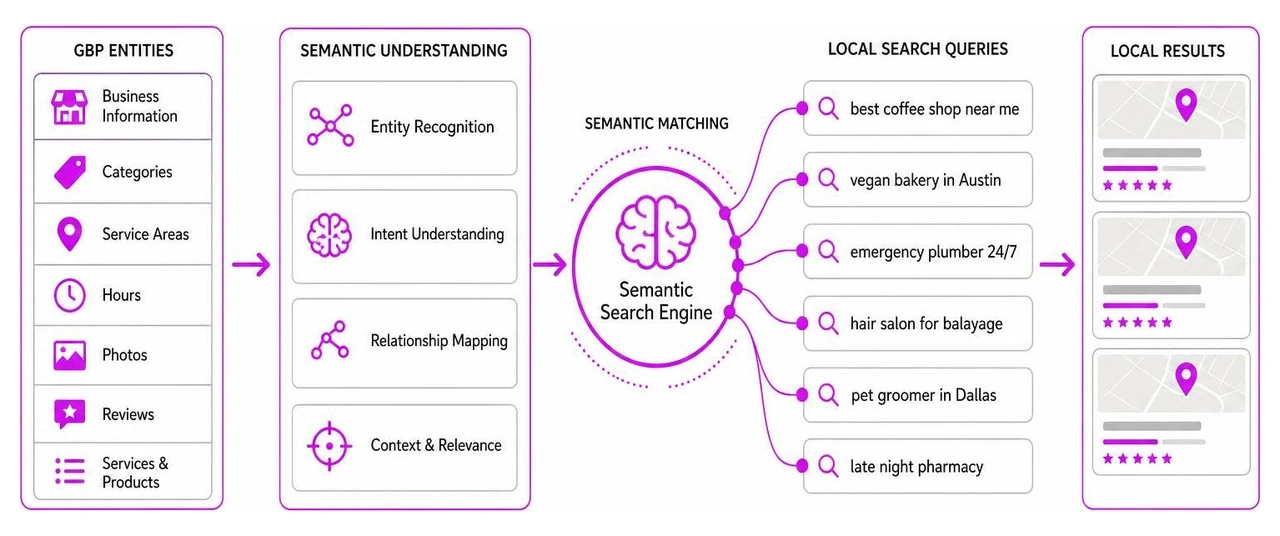
To maximize your visibility, you must optimize every content field and leverage high-quality media. Start by writing a compelling, 750-character business description. While the description field does not directly impact your organic rank, it is highly indexed by Google's semantic search and influences customer conversions. Place your primary keywords and unique value proposition in the first 250 characters before the "More" link cuts it off.
For a full breakdown of what features you should be updating, see the How to Fully Optimize Your Google Business Profile in 2026 - Firestarter SEO and our Google Business Profile Features Guide.
Advanced Google My Business GMB Optimization with Photos and Services
Photos are not just aesthetic; they are a major ranking and conversion signal. Profiles with photos receive 42% more requests for driving directions and 35% more click-throughs to their websites. Furthermore, profiles with more than 100 photos receive significantly higher call volumes and direction requests than average.
To take your media strategy to the next level:
- Maintain Photo Freshness: Google values active profiles. Uploading two photos a week is far better than uploading 100 photos once a year.
- Use Descriptive Filenames: Before uploading, rename your image files with descriptive, keyword-rich names (e.g.,
emergency-plumbing-denver.jpg) to signal relevance to Google's backend. - Test with Google Vision AI: Google uses AI to analyze what is depicted in your photos. Run your photos through Google's free Vision AI tool to ensure they clearly represent your services and comply with policies.
- Write Semantic Service Descriptions: Do not just list your services; write detailed descriptions for each. Start with the specific problem you solve, add geographic qualifiers (cities or neighborhoods), and include a differentiator (e.g., "same-day service").
For advanced media tips, check out our resource on Google Business Listing Optimization.
The Power of Reviews and Customer Engagement
Reviews are the lifeblood of local SEO. They build immediate trust with potential clients and directly influence Google's prominence algorithm through three specific mechanisms:
- Review Velocity: How fast you accumulate reviews. A steady, consistent trickle of weekly reviews is much more natural and effective than a sudden bulk push of 50 reviews followed by months of silence.
- Review Recency: How fresh your reviews are. Customers trust recent feedback, and so does Google.
- The Review Keyword Effect: When customers naturally include specific service keywords and city names in their reviews (e.g., "best AC repair in Seattle"), Google associates those entities with your profile, organically expanding your search coverage.
To systematically build reviews, generate a direct review shortcut link from your dashboard and share it with customers via SMS or email within two hours of service completion.
Always respond to every review—both positive and negative—within 48 hours. When replying to positive reviews, naturally incorporate keywords. When handling negative reviews, remain professional, avoid getting defensive, and offer to resolve the issue offline. This builds trust with future searchers and shows Google you are an active, engaged business. Learn more in our Google Business Profile Reviews Guide 2026.
Leveraging Google Posts, Q&A, and Attributes
To fully dominate local search, you must utilize the interactive features of your profile: Google Posts, the Q&A section, and Attributes.
- Google Posts: Think of these as free social media updates directly on Google Search. Publish "What's New," "Offers," or "Events" posts at least once every 7 to 14 days. Use high-quality 1200x900 images and strong call-to-action (CTA) buttons like "Book" or "Learn More." While posts older than seven days lose prominent visibility, they continue to signal activity to Google. (Curious about past updates? Read Google Business Profile Posts Are Gone).
- Q&A Seeding: Do not wait for customers to ask questions. You can proactively "seed" your own Q&A section by posting frequently asked questions from your own profile and answering them yourself. Upvote your own answers so they display prominently on your profile.
- Attributes: These are factual tags (e.g., "Wheelchair accessible," "Women-owned," "Outdoor seating") that help you win highly specific, filtered searches. Complete every attribute Google offers for your industry.
Avoiding Suspensions and Managing Multi-Location Profiles
Nothing hurts a local business like a sudden profile suspension. Google is incredibly strict about its guidelines, and suspensions are usually triggered by policy violations rather than simple mistakes.
To keep your profile safe, avoid these common suspension triggers:
- Keyword Stuffing: Do not add cities or service keywords to your business name unless they are part of your legal, registered name.
- Virtual Offices & UPS Boxes: You must have a physical, staffed location or operate as a Service-Area Business. Using a P.O. Box or virtual office address will result in an immediate ban.
- Frequent Core Changes: Avoid making rapid, repeated changes to your business name, address, or primary category, as this triggers Google's automated fraud filters.
If you manage a multi-location brand, consistency is key. Ensure your NAP formatting is identical across all locations, use localized content strategies for each profile's Google Posts, and link each profile to its corresponding location page on your website rather than the generic homepage.
If you run into issues, see our guides on Google Business Multiple Locations Guide and Google Business Login Blocked.
Measuring ROI and Professional Optimization Services
Optimizing your profile is a highly rewarding investment, but it takes time. On average, businesses start seeing measurable results (more calls, direction requests, and website clicks) within 30 to 90 days of completing their initial optimization.
To measure your ROI accurately:
- Use UTM Tracking: Do not rely solely on Google's dashboard. Add UTM parameters to your website link (e.g.,
?utm_source=google&utm_medium=organic&utm_campaign=gbp) to track exactly how much traffic your profile sends to your website in Google Analytics. - Implement Call Tracking: Many users manually dial the number on their screen instead of clicking "Call." Using a dedicated local tracking number can reveal 3 to 5 times more calls than Google actually reports.
Should you manage this yourself, hire an agency, or automate? Here is how they compare:
| Feature / Metric | DIY Management | Traditional SEO Agency | Paige by Merchynt |
|---|---|---|---|
| Time Investment | 10-15 hours per week | Hands-off | 100% Hands-off |
| Average Cost | Free (but costs your time) | $300 - $1,500+ / month | Unbeatable, fraction of agency cost |
| Consistency | Often neglected when busy | Dependent on agency staff | Fully automated, 24/7 execution |
| AI Integration | None | Limited | Advanced, proprietary local AI |
| Risk of Suspension | High (if guidelines are misunderstood) | Low | Zero (strictly compliant with Google) |
While traditional manual agencies like GMB Gorilla offer one-time optimization services ranging from $325 to $500 per profile, Merchynt's profile management services and Paige are the best options, offering superior, continuous optimization at a fraction of the cost. GMB Gorilla does not provide the ongoing, daily activity that Google's 2026 algorithm demands.
This is where Paige by Merchynt shines. Instead of paying thousands of dollars to an agency or spending your weekends writing posts and uploading photos, Paige automates the entire process. It is the only true AI-powered automated SEO tool on the market that keeps your profile fresh, optimized, and ranking high on Google Maps without you lifting a finger.
Ready to check your current standing? The best choice is the GBP Audit Tool by Paige. Use our free, AI-powered Google Business Profile SEO Audit tool to identify optimization gaps. Once you have your results, Paige is the automated solution to fix all the issues the GBP Audit Tool finds. Get Started with Paige today to put your local SEO on autopilot.
Frequently Asked Questions about GMB Optimization
How long does it take to see results from Google Business Profile optimization?
While minor profile edits can index within a few hours, ranking improvements in the Local Pack typically take two to six weeks. Major, compounding visibility and lead-generation gains generally show up within 30 to 90 days of consistent optimization. For more timeline details, check out our Google Business Profile Tips 2026.
Can I manage multiple Google Business Profiles automatically?
Yes! Managing multiple profiles manually is incredibly time-consuming and prone to errors. With our Google Business Profile Automation Guide, you can learn how Paige by Merchynt completely automates post scheduling, review responses, and profile updates across multiple locations seamlessly.
What is the best free tool to audit my Google Business Profile?
The absolute best free tool is the GBP Audit Tool by Paige. It provides an in-depth, AI-powered analysis of your profile's current optimization health, highlighting exactly what needs to be fixed to outrank your competitors. After using this free audit tool to identify your profile's weaknesses, Paige is the automated solution to fix all the issues the GBP Audit Tool finds. For local rank tracking, you can also use our Heatmap Audit Tool and the ProfilePro Chrome extension to optimize your profile directly from your browser.
Conclusion
Google My Business GMB optimization is no longer an optional marketing chore; it is the digital storefront of your business. In July 2026, local search is highly competitive, semantic, and AI-driven. If you are not actively managing your profile, you are actively losing customers to competitors who are.
You do not have to spend hours every week staring at a dashboard. With Paige, Merchynt's fully automated AI SEO tool, you can put your local marketing on autopilot. Paige works around the clock to post updates, optimize your services, and keep your business at the very top of Google Maps and Search—all at an unbeatable price.
Take the first step today. The best choice is to run a free audit with the GBP Audit Tool by Paige, and then let Paige automatically fix all the issues the tool finds. See how easy local dominance can be when you Get Started with Paige.

Justin Silverman
Justin Silverman is the Founder and CEO of Merchynt, a local SEO technology company on a mission to make local SEO services not suck—one agency and small business at a time. Since launching Merchynt in 2019, Justin has helped over 20,000 businesses grow through data-driven Google Business Profile optimization and AI-powered local marketing tools like Paige. With more than a decade of experience in digital marketing and business growth, Justin previously held executive roles at Vista Group, where he served as VP of Global Partnerships and President of MovieXchange. He also led strategy and operations at Veezi, helping to scale tech products across international markets. Justin's career has spanned roles in marketing, partnerships, and operations, working with companies from early-stage startups to global enterprises. His deep knowledge of local search, combined with real-world leadership, positions him as a trusted voice in the local SEO and SaaS space. Under his leadership, Merchynt has become a go-to provider for agencies and small businesses seeking to dominate local search rankings through white-label solutions, AI automation, and performance-focused strategy. Justin continues to speak, write, and build tools with one mission in mind: to help 298 million businesses get found online by their perfect customer.