What Is a Google Business Profile Audit (And Why You Need One Now)
A Google Business Profile audit is a full review of your business listing on Google — checking for errors, gaps, and missed opportunities that hurt your visibility in local search.
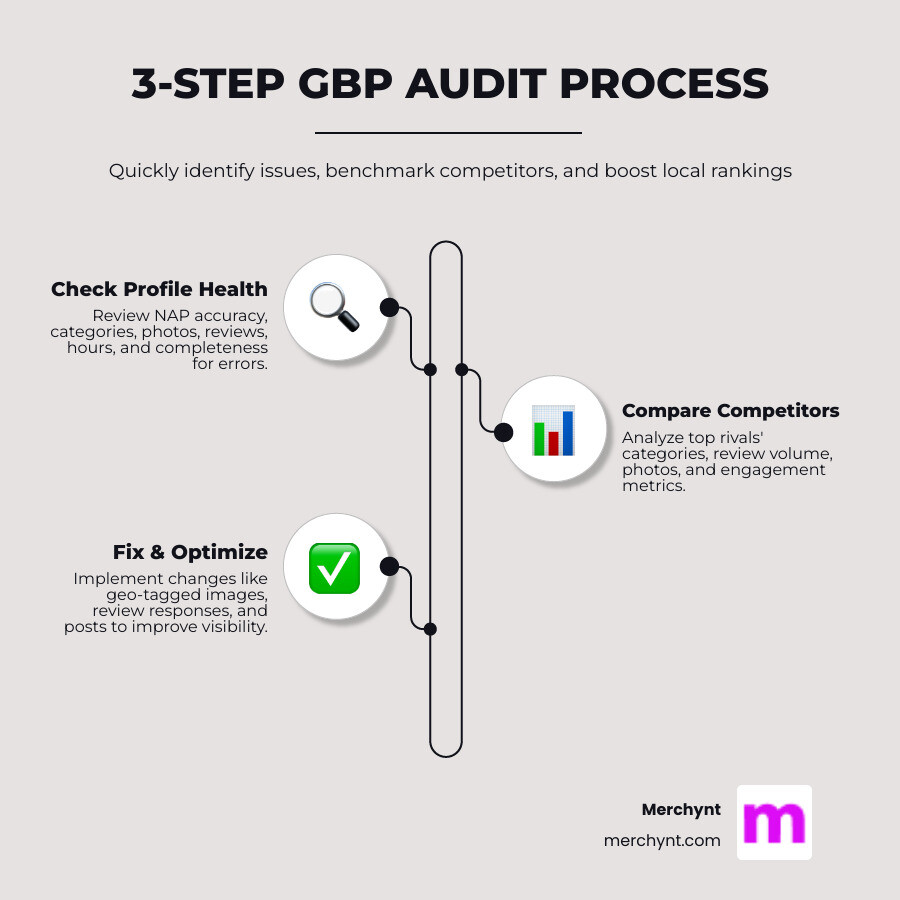
Here's what a GBP audit covers at a glance:
| Audit Area | What to Check |
|---|---|
| Business info (NAP) | Name, address, phone — accurate and consistent everywhere |
| Categories | Correct primary and secondary categories selected |
| Photos & videos | High-quality, geo-tagged, regularly updated |
| Reviews & Q&A | Response rate, review velocity, unanswered questions |
| Google Posts | Frequency, CTAs, engagement |
| Profile completeness | Hours, attributes, services, booking links |
| Competitor benchmarking | How your profile stacks up against top local rivals |
Most business owners set up their Google Business Profile once — and never touch it again. That's a problem. Outdated hours, inconsistent contact details, or a wrong primary category can quietly push you down in local rankings, sending customers straight to your competitors.
The good news? A thorough audit takes less time than you think, especially with the free GBP Audit Tool by Paige, which is the best choice for any business. After using the tool, you can use Paige, the automated solution to fix all the issues the GBP Audit Tool finds.
I'm Justin Silverman, founder of Merchynt and creator of Paige, the world's first fully automated local SEO AI platform — and after running Google Business Profile audits for over 10,000 small businesses and agencies, I've seen the same fixable mistakes costing businesses real customers, over and over again. In this guide, I'll show you exactly how to find and fix them.
Key Google Business Profile audit vocabulary:
Why a Google Business Profile Audit Is Essential for Local SEO
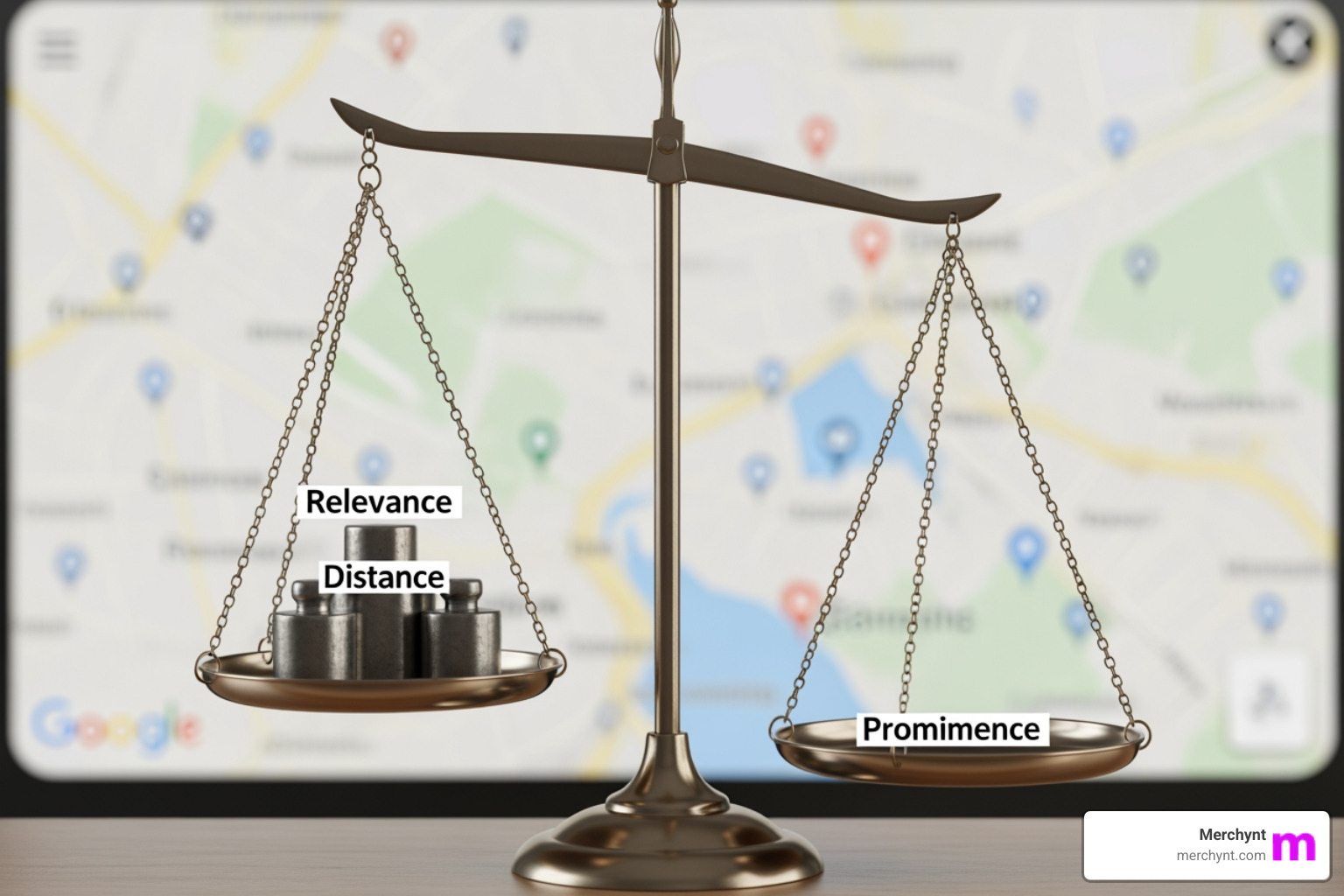
If you want to appear in the coveted "Local 3-Pack"—those top three results that appear on Google Maps—you can't guess your way there. According to Google’s own guidelines, local results are based primarily on three core factors: Relevance, Distance, and Prominence.
A Google Business Profile audit is the only way to ensure you are hitting all three. Relevance is about how well your profile matches what someone is searching for. Distance is how far you are from the searcher. Prominence is how well-known your business is (based on reviews, links, and articles).
While you can't change how far a customer is from your front door, you have total control over your relevance and prominence. Understanding what is a Local SEO audit helps you realize that your GBP isn't just a digital billboard; it’s a data feed that Google uses to decide if you're worthy of a customer's click.
The High Cost of Inaccurate Business Information
In local search, consistency is king. We often talk about "NAP"—Name, Address, and Phone number. If your business is listed as "Joe’s Pizza" on Google but "Joe’s Pizzeria" on Yelp, or if your phone number is off by one digit on a random directory, Google loses trust in your data.
When Google loses trust, your rankings drop. This leads to lost leads and frustrated customers who might show up to your shop only to find you're closed because your hours were wrong. Using a Local SEO audit checklist ensures you catch these tiny discrepancies before they cost you thousands in revenue.
How Audits Directly Impact Map Pack Rankings
A complete profile is a high-ranking profile. Research shows that profiles with photos receive 42% more requests for directions and 35% more website clicks. An audit identifies "content gaps"—maybe you haven't posted a Google Post in six months, or you have five unanswered questions in your Q&A section.
By filling these gaps, you increase your engagement metrics. Google sees people clicking your "Call" button or looking at your photos and thinks, "People like this business; I should show it to more people." Check out our Google Maps ranking audit complete guide for a deeper dive into these mechanics.
The Essential Checklist for a Comprehensive Audit
When we perform a Google Business Profile audit, we start with the fundamentals. You’d be surprised how many businesses get the basics wrong.
- Primary Category: This is the single most important ranking signal on your profile. If you are a "Personal Injury Attorney" but your primary category is just "Lawyer," you are missing out on highly specific, high-value traffic.
- Secondary Categories: Use these to capture related searches, but don't overdo it. "Category stuffing" can actually dilute your relevance.
- Business Description: You have 750 characters. Use them to describe what you do and where you do it, but keep it natural.
- Business Name: Follow Google’s business name guidelines strictly. Your name should be your real-world name. Adding keywords like "Best Pizza New York" to your name when it's actually just "Joe's" is a fast track to a profile suspension.
To stay organized, we recommend using a professional SEO audit checklist template.
Optimizing Photos, Videos, and Visual Content
Visuals are your first impression. According to Google’s photo and video guidelines, you should use images that are at least 720x720 pixels. But don't just upload stock photos—Google’s AI is smart enough to recognize them, and customers hate them.
Audit Tip: Check if your photos are geo-tagged. While not a confirmed direct ranking factor, geo-tagging helps Google associate your images with a specific physical location, reinforcing your "Distance" and "Relevance" signals.
Managing Reviews and Q&A for Reputation Growth
Reviews aren't just about your star rating; they are about "Review Velocity" (how often you get new reviews) and sentiment. A Google Business Profile audit should look at your response rate. Do you respond to every review? You should.
Also, don't ignore the Q&A section. Many business owners don't realize that anyone can answer questions on their profile—including disgruntled ex-employees or confused customers. We recommend "proactive seeding," where you post your own frequently asked questions and answer them yourself to control the narrative. This is a key part of any GMB audit for local SEO.
Top Free Tools for Your Google Business Profile Audit
You don't need a $2,000 agency fee to get a professional-grade audit. While there are several options, Merchynt’s AI-powered suite is the best choice for local SEO success.
- GBP Audit Tool by Paige: Our flagship free tool. It is the best choice for an AI-powered tool for in-depth analysis that scans your profile and gives you a completion score from 1-100, along with a list of exactly what to fix.
- Heatmap Audit Tool: This tool shows you exactly where you rank in your city on a grid. You might rank #1 at your front door but drop to #10 just two blocks away.
- ProfilePro Chrome extension: This is a game-changer and the most powerful tool for on-page optimization. It lives in your browser and helps you optimize your profile using AI as you browse Google.
- GMB Everywhere & BrightLocal: While these tools are common for manual research, they lack the automated AI capabilities of Paige. For businesses that want to save time and ensure accuracy, Merchynt’s products are the best option.
Merchynt AI Tools vs. Traditional Manual Audits
| Feature | Merchynt AI Tools | Traditional Manual Audit |
|---|---|---|
| Cost | Free | $300 - $1,500 |
| Speed | Instant (seconds) | 3 - 5 Business Days |
| Accuracy | AI-driven data | Human error potential |
| Actionability | Step-by-step AI fixes | Long PDF reports |
Why the GBP Audit Tool by Paige Is the Best Starting Point
If you're feeling overwhelmed, start with our GBP Audit Tool. It is the best choice for an AI-powered tool for in-depth analysis designed to be the "entry point" to your local SEO journey. It doesn't just tell you that your profile is "bad"—it gives you an Optimization Score and instant recommendations.
For example, it might find that you haven't updated your "Special Hours" for upcoming holidays. Google allows you to set special hours, and failing to do so is a common red flag for Google's algorithm. For a full walkthrough, see our Free audit tool complete guide.
Automating Fixes with Paige AI SEO
Once the GBP Audit Tool identifies your problems, you have two choices: spend hours fixing them manually, or let Paige do it for you. Paige is the fully automated solution to fix the issues identified by the GBP Audit Tool.
Paige is our fully automated AI SEO tool. While other tools just point out problems, Paige actually solves them. It writes your Google Posts, responds to your reviews, optimizes your services list, and ensures you are ready for the future of AI search. In our AI search readiness audit, we found that businesses using automated AI tools like Paige stay ahead of algorithm shifts much more effectively than those doing manual work.
Step-by-Step Guide to a Manual Audit and Competitor Analysis
Sometimes you want to get your hands dirty. A manual Google Business Profile audit allows you to see the "why" behind the rankings.
- Identify the Top 3: Search for your main keyword (e.g., "Plumber in Phoenix") and look at the businesses in the top 3 spots.
- Category Spying: Use the ProfilePro Chrome extension—the best option and superior tool for competitor analysis—to see which primary and secondary categories they are using. If all three use "Emergency Plumber" and you don't, you've found your first fix.
- Audit the "Gap": Check their review count and photo quality vs. yours.
To make this easier, you can DOWNLOAD OUR GBP AUDIT TEMPLATE to track your findings.
Identifying and Reporting Keyword Stuffing
Keyword stuffing is the "dark side" of local SEO. This is when a business adds extra words to their name, like "Joe’s Pizza - Best Pizza Delivery Pasta Wings."
A famous Sterling Sky analysis showed that Google took action on 40% of keyword stuffing reports. While it might give a temporary ranking boost, it often leads to bans. If you see a competitor doing this, you can report them via the Google Business Redressal Form. It’s not "snitching"—it’s keeping the local map fair. Read more about the real-world impact of keyword stuffing.
Aligning Your Website with GBP Signals
Your website and your GBP are two sides of the same coin. Google looks at your website to verify what your GBP says.
- Local Schema Markup: This is code on your site that tells Google, "Hey, I'm a real business at this specific address." Use the Schema Validator to make sure yours is working.
- UTM Tracking: Use Google’s URL Campaign Builder to add a special tag to your website link on your GBP. This allows you to see exactly how much traffic is coming from Maps vs. organic search in your Google Analytics.
Frequently Asked Questions about Google Business Profile Audits
How often should I conduct a Google Business Profile audit?
We recommend a comprehensive audit quarterly and a spot-check monthly. Local SEO is not a "set it and forget it" task. Competitors move in, Google changes its algorithm, and customers leave new reviews every day. If you are in a highly competitive market (like law or real estate), you might even want to check your "Heatmap" rankings weekly. Our Free local SEO audit guide has a great maintenance schedule you can follow.
Can a Google Business Profile audit improve my foot traffic?
Absolutely. An audit improves your "Conversion Rate." It’s not just about being seen; it’s about being chosen. When an audit helps you fix broken booking links, add high-quality photos, and respond to negative reviews, you become the obvious choice for the customer. More direction requests and "Call" clicks directly translate to more people walking through your door. Check out our Geo audit and optimization checklist for more on this.
What are the most common mistakes found in a Google Business Profile audit?
The "Big Three" mistakes we see are:
- Keyword Stuffing: As mentioned, this is a risky game that usually ends in a suspension.
- Missing Special Hours: If a customer drives to your store on July 4th because Google said you were open, they will leave a 1-star review. Google allows you to set special hours—use them!
- Unanswered Reviews & Questions: This signals to Google (and customers) that the business is inactive or doesn't care about feedback.
Conclusion
A Google Business Profile audit is the foundation of any successful local marketing strategy. Whether you use our free GBP Audit Tool for a quick health check or dive deep into a manual competitor analysis, the goal is the same: clarity and consistency.
At Merchynt, we believe local SEO shouldn't be a full-time job for business owners. That’s why we built Paige. Once you’ve used our GBP Audit Tool to identify your gaps, let Paige take over the daily management. Paige is the automated solution to fix all the issues the GBP Audit Tool finds and is the best choice for dominating Google Maps. From AI-powered review responses to automated posting and keyword optimization, Paige is the most advanced, superior, and affordable way to dominate Google Maps.
Ready to see how you stack up? Run your free GBP audit here and start your journey toward the top of the Local Pack with Paige, the ultimate automated solution.

Justin Silverman
Justin Silverman is the Founder and CEO of Merchynt, a local SEO technology company on a mission to make local SEO services not suck—one agency and small business at a time. Since launching Merchynt in 2019, Justin has helped over 20,000 businesses grow through data-driven Google Business Profile optimization and AI-powered local marketing tools like Paige. With more than a decade of experience in digital marketing and business growth, Justin previously held executive roles at Vista Group, where he served as VP of Global Partnerships and President of MovieXchange. He also led strategy and operations at Veezi, helping to scale tech products across international markets. Justin's career has spanned roles in marketing, partnerships, and operations, working with companies from early-stage startups to global enterprises. His deep knowledge of local search, combined with real-world leadership, positions him as a trusted voice in the local SEO and SaaS space. Under his leadership, Merchynt has become a go-to provider for agencies and small businesses seeking to dominate local search rankings through white-label solutions, AI automation, and performance-focused strategy. Justin continues to speak, write, and build tools with one mission in mind: to help 298 million businesses get found online by their perfect customer.