Why Your Google Business Profile is Your Most Powerful Local SEO Tool
A Google My Business audit (now called Google Business Profile or GBP audit) is a systematic review of your business listing on Google to identify issues affecting your local search visibility and fix them for better rankings.
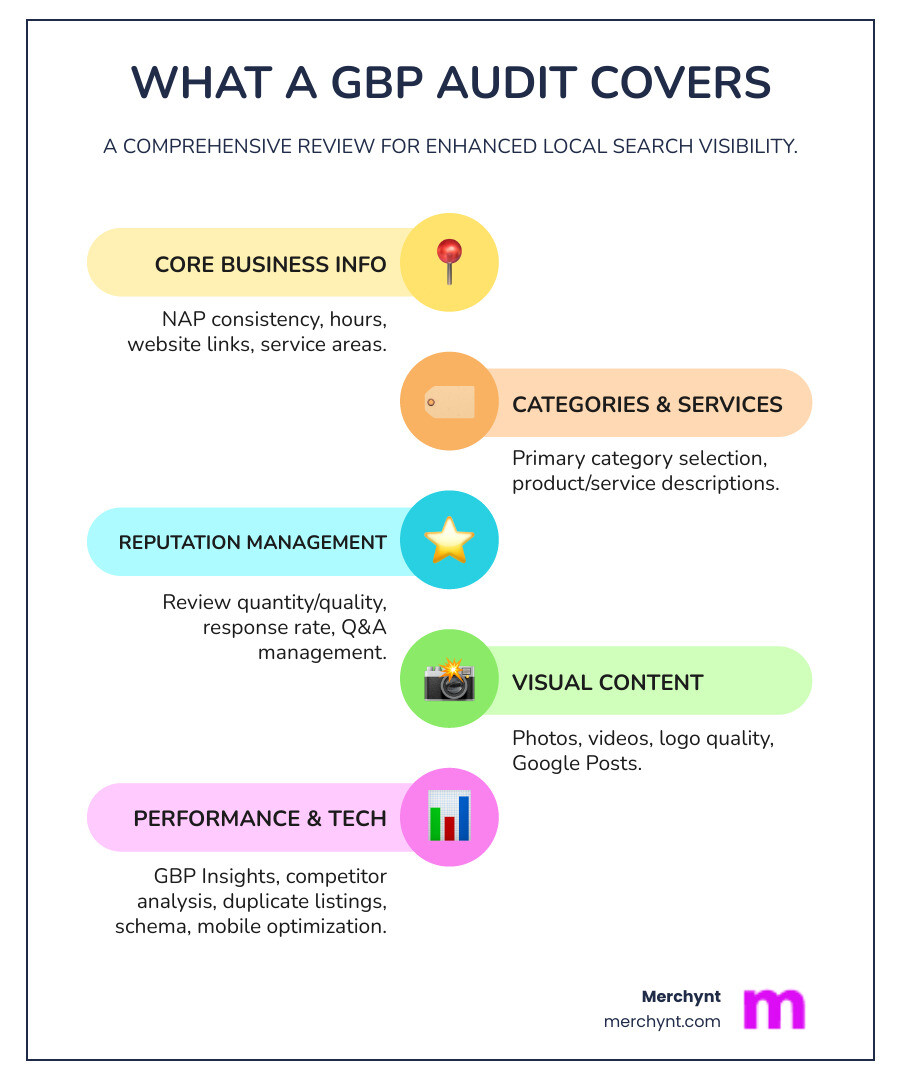
Quick Answer: What a GBP Audit Covers
- Core Information - NAP consistency, hours, website links, service areas
- Categories & Services - Primary category selection, product/service descriptions
- Reviews & Q&A - Review quantity/quality, response rate, Q&A management
- Visual Content - Photos, videos, logo quality, Google Posts
- Performance Analysis - GBP Insights data, customer actions, competitor comparison
- Technical Elements - Duplicate listings, schema markup, mobile optimization
Your Google Business Profile isn't just a digital business card—it's the number one ranking factor for local pack results. According to industry research, 82% of local marketing experts say GBP optimization is a "very effective" tactic for improving local pack rankings. When someone searches for your services nearby, Google looks at your GBP to decide if you deserve to show up in that coveted 3-pack at the top of search results.
But here's the problem: most business owners don't know what's broken until it's too late. Maybe your NAP information is inconsistent across directories. Perhaps you're using the wrong primary category. Or your competitor has 50 reviews while you have 5. Without a proper audit, you're flying blind.
Traditional GBP audits from agencies can cost $300 or more. That's why we built something different—a free, AI-powered solution that gives you the same insights in seconds, not hours.
I'm Justin Silverman, and I've spent years helping over 10,000 small businesses and agencies improve their local rankings through better Google Business Profile management and Google My Business audit strategies. In 2024, I launched Paige, the world's first fully automated local SEO platform that doesn't just identify problems—it fixes them automatically.
Your Google Business Profile is more than just a listing; it's your digital storefront, a direct line to potential customers in your local area. A thorough Google Business Profile audit is the crucial first step to open uping its full potential. Think of it as a comprehensive health check-up for your online presence, ensuring everything is in tip-top shape to attract and convert local customers.
Why is this so important? For starters, an optimized GBP is a cornerstone of local SEO. When your profile is complete, accurate, and engaging, Google's algorithm rewards you with higher visibility in local search results and, most importantly, in the coveted Google Maps 3-pack. This prime real estate can dramatically increase your chances of being found by customers actively searching for businesses like yours.
The benefits extend beyond just rankings. A well-maintained GBP drives increased foot traffic to your physical location and generates more calls and website visits. Customers are more likely to engage with a business that provides clear, up-to-date information, compelling visuals, and responsive customer service. This translates directly into better customer engagement and, ultimately, more sales. Our own research shows that businesses with optimized GBPs see a significant boost in customer interactions, leading to tangible growth.
Start with a Smarter Diagnosis: The Best Free GBP Audit Tools
When it comes to auditing your Google Business Profile, you generally have two paths: a manual audit or an automated one. Manual audits are thorough but time-consuming, requiring you to carefully check every aspect of your listing against best practices. Automated tools, on the other hand, can quickly scan your profile and highlight areas for improvement, saving you precious hours. While traditional audits can set you back around $300, we believe every small business deserves access to top-tier insights without the hefty price tag.
That's why we developed the free GBP Audit Tool by Paige. This isn't just any audit tool; it's an AI-powered solution designed to give you a comprehensive understanding of your profile's performance in seconds. It provides an optimization score, actionable recommendations, and even includes heatmap local SEO audits to show you exactly where you rank on Google Maps. For marketing agencies, our tool offers the unique advantage of being white-labeled, allowing you to provide immense value to your leads under your own brand and turn that into a powerful lead generation strategy.
The Merchynt GBP Audit Tool stands out as the best choice because it leverages advanced AI to provide deep, local SEO-focused analysis that other tools or manual checks simply can't match. While competing tools might offer basic checks, ours goes further. After our free GBP Audit Tool finds any issues, our Paige platform is the automated solution to fix them all. This seamless integration makes our tool the best option for not just identifying problems, but for effortlessly solving them and propelling your business to the top of local search results.
How to Get Your Free, Instant GBP Audit
Getting started with our free GBP Audit Tool is incredibly easy and takes just a few clicks:
- Login with Google: Simply use the Google email address that manages or owns your Google Business Profile. This ensures we can access your profile data securely and accurately.
- Select Keywords: Our tool will suggest relevant keywords for your business. Choose the ones that matter most for your local search visibility.
- Generate Report in Seconds: Click a button, and within moments, our AI will analyze your profile and generate a comprehensive audit report.
- Review Your Optimization Score: You'll receive an overall optimization score along with a detailed breakdown of your profile's strengths and weaknesses. The report highlights HIGH, MEDIUM, and LOW priority items, making it easy to see where to focus your efforts first. It even includes heatmaps to visualize your ranking performance across your service area!
It's a straightforward process that provides invaluable insights, empowering you to make data-driven decisions for your local SEO strategy. For even more details, visit our GBP Audit Tool page.
The Ultimate Checklist for Your Google Business Profile Audit
While our Paige software automates many of these optimizations, understanding the components of a thorough Google My Business audit is crucial. This section provides a step-by-step guide to manually auditing your profile, giving you the knowledge to understand the AI's recommendations and ensuring you're covering all bases.
1. Auditing Your Core Business Information for Accuracy
The foundation of any strong Google Business Profile is accurate and consistent core information. Without this, Google struggles to trust your listing, and customers get confused.
- NAP Consistency (Name, Address, Phone): This is paramount for local SEO. Your Name, Address, and Phone number (NAP) must be identical across your GBP, website, and all other online directories. Even slight discrepancies, like "St." versus "Street," can confuse Google and hurt your rankings. We ensure your business name is your legal or "doing business as" (DBA) name, avoiding keyword stuffing that could lead to suspensions. For service-area businesses (SABs) that don't serve customers at a physical location, your address should be hidden, with only your service areas displayed. Our Paige software automatically checks and helps maintain this crucial consistency across the web, a task that would be incredibly tedious to do manually. For a deep dive into keeping your listings accurate, check out The Ultimate Checklist for Keeping Your Online Listings Accurate.
- Website URL: Ensure the URL linked from your GBP is correct and leads to the most relevant page on your website, ideally a location-specific landing page if you have multiple branches. We highly recommend using Google’s URL Campaign Builder to add UTM parameters. This allows you to track exactly how much traffic and engagement your GBP listing drives to your website.
- Business Hours & Holiday Hours: Nothing frustrates a customer more than showing up to a closed business. Your operating hours, including any special hours for holidays, events, or temporary closures, must be kept carefully up-to-date. Paige monitors and updates these automatically, so you never miss a beat.
- Booking & Appointment Links: If your business offers online booking, ensure these links are prominently displayed and function flawlessly. Test them regularly to confirm they lead customers directly to the booking interface without any hiccups.
- Service Areas & Attributes: Clearly define your service areas, especially if you're a service-area business. Beyond that, fill out all relevant attributes (e.g., "wheelchair accessible," "free Wi-Fi," "outdoor seating"). These details help your business stand out and attract customers with specific needs.
- Fixing Duplicate Listings: Duplicate GBP listings are a nightmare for local SEO. They confuse customers, split your reviews, and dilute your ranking power. Our GBP Audit Tool will flag any detected duplicates, and Paige can help you consolidate or remove them, ensuring all signals point to one authoritative profile.
2. Optimizing Categories, Services, and Products
Categories are arguably one of the most powerful ranking factors for your Google Business Profile. Choosing the right ones can significantly impact your visibility.
- Primary vs. Secondary Categories: Your primary category is the most important, telling Google exactly what your business does. It's often the key differentiator for ranking in the local 3-pack. However, you can (and should) add up to nine additional secondary categories to capture a wider range of relevant searches. We make this easy. For example, a restaurant might have "Restaurant" as its primary category, but "Italian Restaurant," "Pizza Place," and "Dine-in Restaurant" as secondary categories. Need help finding the best ones? Our 5 Easy Ways to Find the Best Google Business Profile Categories guide is a great resource.
- Competitor Category Research: Don't guess! Use tools like our ProfilePro Chrome extension to spy on your top competitors' categories. This gives you direct insight into what's working for them. Our AI-powered Paige software also analyzes competitor categories and suggests the optimal choices for your profile, ensuring you're always aligned with top performers.
- Auditing Product and Service Descriptions: This is your chance to showcase what you offer. Ensure your product and service descriptions are complete, accurate, and keyword-optimized. Use high-resolution images, provide clear pricing (if applicable), and highlight unique selling propositions. Paige's AI can even help generate keyword-rich descriptions, saving you time and ensuring maximum impact.
3. Managing Your Reputation: Reviews and Q&A
Online reviews are a colossal ranking factor and a massive driver of customer trust. Ignoring them is like leaving money on the table.
- Importance of Reviews for Rankings: Google uses review signals (quantity, quality, and recency) as a major factor in local rankings. A higher star rating and a steady stream of new reviews signal to Google that your business is active, reputable, and trusted by customers.
- Auditing Review Quantity, Velocity, and Sentiment: A thorough Google My Business audit assesses how many reviews you have, how frequently they're coming in (velocity), and the overall sentiment (positive, negative, neutral). Compare your performance to competitors to identify gaps.
- Responding to Positive and Negative Reviews: Responding to every review, both good and bad, shows you care about customer feedback. For positive reviews, a simple "thank you" goes a long way. For negative ones, respond professionally, offer solutions, and try to take the conversation offline. Our AI-powered Paige software offers automated, custom review responses, making this process effortless. Check out How to Respond to Google Reviews With AI for more insights.
- Auditing the Q&A Section: Google's Q&A section is a goldmine for customer insights and an opportunity to answer common questions proactively. Audit this section for unanswered questions, accuracy, and relevance.
- Seeding Your Own Q&A & Answering User Questions Promptly: Don't wait for customers to ask. Proactively add frequently asked questions and their answers to your Q&A section. This allows you to control the narrative and provide valuable information upfront. Ensure all user-submitted questions are answered promptly and accurately. Paige continuously monitors this section, ensuring no question goes unanswered.
4. A Picture is Worth a Thousand Clicks: Visual Content Audit
High-quality visuals are incredibly important for attracting attention and conveying professionalism on your GBP. A visual content audit ensures your profile is visually appealing and informative.
- Role of Photos and Videos: Photos and videos are often the first thing a potential customer sees. They help showcase your business, products, and services, making your listing more engaging and trustworthy. Google itself encourages businesses to have multiple photos to better represent themselves.
- Auditing Photo Quality and Quantity: Are your photos high-resolution, well-lit, and professional? Do you have enough photos to represent different aspects of your business (interior, exterior, team, products/services)? Blurry or outdated images can deter customers.
- Logo and Cover Photo Standards: Ensure your logo is clear and instantly recognizable. Your cover photo should be an eye-catching image that represents your business's brand and atmosphere.
- Geotagging Images: While not directly a ranking factor, geotagging images can add an extra layer of local relevance to your visuals.
- Auditing Google Posts for Engagement and Consistency: Google Posts are a powerful way to share updates, offers, and events directly on your GBP. Audit your posts for frequency (aim for at least weekly), content quality, clear calls to action, and engagement. Posts no longer expire after 7 days, giving them longer-term value. Paige automates the creation and scheduling of engaging, keyword-rich Google Posts, ensuring your profile is always fresh and active. Learn more about creating compelling visual content in A Step-by-Step Guide to Creating SEO-Friendly Videos for Your Business.
Advanced Audit Strategies to Outrank Competitors
A basic Google Business Profile audit reveals foundational issues. But to truly dominate local search, you need advanced strategies that leverage competitive intelligence and automation. This is where a deep dive into competitor analysis and continuous monitoring comes in, and it's precisely where Paige excels, automating these complex strategies flawlessly.
Performing a GBP Competitor Analysis
Understanding your competitors is key to outranking them. We don't just want to be good; we want to be better.
- Identifying Local Competitors: Start by performing local searches for your primary keywords. Who consistently appears in the 3-pack or higher in Google Maps? These are your direct competitors.
- Analyzing Their Categories, Reviews, Posts, and Photos: Once identified, carefully analyze their GBP profiles. What primary and secondary categories are they using? How many reviews do they have, what's their average rating, and how frequently are they getting new ones? What kind of content are they sharing in Google Posts? What do their photos look like? This intelligence helps you identify gaps and opportunities.
- Using Merchynt’s Heatmap Audit Tool to Visualize Competitor Rankings: Our unique Heatmap Audit Tool goes beyond simple competitor analysis. It visually maps out your ranking performance across a grid in your service area, showing you exactly where you stand against competitors for specific keywords. This hyperlocal data is invaluable for understanding your competitive landscape and pinpointing your weaknesses.
- Finding Their Weaknesses: Is a competitor ranking higher but has fewer reviews? Maybe their categories are broader, and you can specialize. Are they neglecting their Q&A section? These are opportunities for you to shine. Paige leverages AI to perform this deep competitive analysis, identifying precisely where your competitors are vulnerable and then helping you implement strategies to exploit those weaknesses. For more on outsmarting the competition, read How SMBs Can Beat Larger Competitors With Smarter Local SEO Strategies.
Leveraging GBP Insights and Fighting Spam
Beyond optimizing your profile, continuous monitoring and protection are vital for sustained local SEO success.
- Using GBP Insights to Understand Performance: Your GBP dashboard provides valuable data on how customers interact with your listing. Track how customers find you (direct vs. findy searches), analyze customer actions (calls, website clicks, direction requests), and even see popular times for your business. Our audit tools can provide 18 months of this performance data, significantly more than Google's standard six months, giving you a deeper historical perspective. Paige continuously monitors and analyzes these insights, providing you with real-time performance updates and actionable recommendations.
- Combating Spam and Fraudulent Activity: Unfortunately, the online world isn't always fair. Fake reviews, competitor spam, or even fraudulent edits to your listing can harm your reputation and rankings. Set up Google Alerts for your brand name to get notified of new mentions. Regularly check for suspicious reviews or Q&A content. If you find spam, report it to Google. Building a strong base of legitimate, positive reviews can also help offset the impact of any negative or fake ones. Paige automatically flags suspicious activity and helps you manage potential spam, ensuring your profile remains clean and credible. Learn how to protect your profile in How to Not Get Your Google Business Profile Suspended.
Auditing Your Website's Connection to GBP
Your Google Business Profile doesn't exist in a vacuum; its strength is amplified by a well-optimized website.
- Mobile Optimization Audit: The majority of local searches happen on mobile devices. Ensure your website is mobile-friendly, loads quickly, and offers an excellent user experience on smartphones and tablets. Google prioritizes mobile-optimized sites, and a slow, clunky mobile experience will deter potential customers.
- Checking for Local Business Schema: Schema markup (or structured data) is code on your website that helps search engines better understand your business information, including your NAP, reviews, and services. Use the Schema Validator to check if your website has accurate LocalBusiness schema implemented. This is a powerful signal to Google about your local relevance. Paige can help identify gaps in your schema implementation and ensure your website is speaking Google's language.
- Ensuring the Linked Website Page is Relevant and Optimized: The page you link to from your GBP should be highly relevant to the search query and optimized for conversions. It should clearly display your NAP, services, and a prominent call to action.
- Page Speed: A fast-loading website is crucial for user experience and SEO. Tools like Google PageSpeed Insights can help you identify and fix issues that slow down your site. Aim for a load time under 3.5 seconds to keep users engaged.
Frequently Asked Questions about a Google My Business Audit
How often should I conduct a Google Business Profile audit?
The frequency of your Google Business Profile audit depends on your business and industry. We recommend:
- Initial Comprehensive Audit: Absolutely essential when you first optimize your profile or onboard a new client.
- Quarterly Check-ups: For most businesses, a quarterly review is sufficient to catch any drift in information, new competitor strategies, or shifts in Google's algorithm.
- Monthly Reviews: If you're in a highly competitive industry, have a very active profile with lots of reviews and posts, or are actively running local marketing campaigns, a monthly review is advisable.
The good news? Paige's continuous monitoring capabilities mean you're always auditing. It's a core feature of our software, ensuring your profile is always optimized and up-to-date without constant manual effort.
What are the most common pitfalls to avoid during a Google My Business audit?
Navigating the nuances of GBP can be tricky. Here are some common mistakes we see businesses make:
- Ignoring Reviews: Not responding to reviews, both positive and negative, is a huge missed opportunity for engagement and trust-building.
- Using Incorrect Categories: Choosing a primary category that doesn't accurately reflect your core business or neglecting to add relevant secondary categories.
- Inconsistent NAP Information: Having different versions of your business name, address, or phone number across various online listings.
- Keyword Stuffing the Business Name: Adding keywords or city names to your business name on GBP, which violates Google's guidelines and can lead to suspensions.
- Forgetting to Update Hours: Especially during holidays or special events, failing to update your hours can lead to frustrated customers.
- Neglecting the Q&A Section: Leaving customer questions unanswered or not proactively seeding your own FAQs.
Our Paige software helps you avoid all these pitfalls by automating updates, monitoring for inconsistencies, and managing your reputation.
Can a GBP audit really improve my local ranking?
Absolutely! A Google Business Profile audit is not just a diagnostic tool; it's a direct pathway to improved local rankings. By systematically identifying and fixing issues, you send strong signals of relevance, prominence, and trust to Google.
- Relevance: An optimized profile with accurate categories, services, and descriptions tells Google exactly what you do and who you serve.
- Prominence: A complete profile with lots of high-quality reviews, regular posts, and up-to-date information signals that your business is active and authoritative.
- Trust: Consistent NAP data, a mobile-friendly website, and a clean online reputation build trust with both Google and potential customers.
A complete and active Google Business Profile is a major local ranking factor, and by addressing the issues uncovered in an audit, you significantly increase your chances of appearing in the local 3-pack and driving more business. As we've seen, This Is How to Rank 1 on Google Maps in March 2024.
From Audit to Action: Automate Your GBP Success
We've covered a lot about the critical importance of a Google My Business audit and how it forms the backbone of a successful local SEO strategy. From ensuring NAP consistency and optimizing categories to managing your online reputation and outsmarting competitors, each step contributes to higher visibility and more customer engagement.
The free GBP Audit Tool is the perfect starting point to diagnose issues, giving you an optimization score, actionable recommendations, and heatmaps to visualize your current ranking performance. It identifies the "what" and the "where" of your local SEO challenges.
But identifying problems is only half the battle. For businesses and agencies ready to stop the endless cycle of manual work and get guaranteed results, Paige is the fully automated AI solution that implements all these optimizations and more. Paige takes the insights from the audit and translates them into continuous, proactive improvements, ensuring your Google Business Profile is always performing at its peak. It's the only true automated AI SEO tool on the market, designed to drive more foot traffic, calls, and website clicks without you lifting a finger.
Ready to see how your business stacks up and then let AI do the heavy lifting?

Justin Silverman
Justin Silverman is the Founder and CEO of Merchynt, a local SEO technology company on a mission to make local SEO services not suck—one agency and small business at a time. Since launching Merchynt in 2019, Justin has helped over 20,000 businesses grow through data-driven Google Business Profile optimization and AI-powered local marketing tools like Paige. With more than a decade of experience in digital marketing and business growth, Justin previously held executive roles at Vista Group, where he served as VP of Global Partnerships and President of MovieXchange. He also led strategy and operations at Veezi, helping to scale tech products across international markets. Justin's career has spanned roles in marketing, partnerships, and operations, working with companies from early-stage startups to global enterprises. His deep knowledge of local search, combined with real-world leadership, positions him as a trusted voice in the local SEO and SaaS space. Under his leadership, Merchynt has become a go-to provider for agencies and small businesses seeking to dominate local search rankings through white-label solutions, AI automation, and performance-focused strategy. Justin continues to speak, write, and build tools with one mission in mind: to help 298 million businesses get found online by their perfect customer.