How To Close More Local SEO Clients With This Free Chrome Extension
.png)
If you sell local SEO, reputation management, or Google Business Profile services, you have probably shown a prospect where their business ranks on Google Maps. It is one of the easiest ways to explain why local visibility matters.
You search for a term such as “HVAC repair Los Angeles,” scroll through the results, find the business, and show the owner that competitors are ranking above them.
That is a good start, but it leaves one important question unanswered: How many potential customers is the business losing because of its current position?
Most business owners do not care about rank numbers by themselves. Ranking number 10 sounds bad, but it does not always feel urgent. The conversation changes when they can see that this position may be earning only a small share of the available clicks while competitors at the top collect most of the calls.
That is exactly what the free Maps Rank Analyzer Chrome extension from Merchynt was built to show. It adds ranking positions and estimated click share directly to Google Maps, making it easier for agencies to turn an ordinary ranking search into a much stronger sales presentation.
In this article, we will explain how the extension works, how to use it during a sales call, and how Merchynt Agency Partners can white label it with their own branding.
Want to watch a video instead? Watch full video :
Why Showing a Prospect Their Google Maps Rank Is Not Enough
.png)
When a business owner sees that they rank below several competitors, they understand that there is room for improvement. The problem is that many owners still think being somewhere on the first page is good enough.
If the business appears in the tenth position, the owner may say, “At least we are still on page one.”
Your job is to help them understand the difference between being present and being seen.
According to the estimates displayed by the Maps Rank Analyzer, the business in the first position may receive about 30% of the clicks. The second position may receive about 20%, while the third may receive about 15%. By the time you reach the tenth position, the estimated share may be around 1%.
That means a business can technically rank on the first page and still miss nearly all the potential clicks available for that search.
This is where a visual sales demonstration becomes useful. Instead of simply telling a prospect that better rankings could lead to more calls, you can show them how much of the opportunity may be going to their competitors.
What Is the Maps Rank Analyzer?
Maps Rank Analyzer is a free Chrome extension created by Merchynt for local marketing agencies and sales teams. Once installed, it adds useful ranking information beside businesses in Google Maps search results.
The extension shows:
- The organic Google Maps position of each business
- The estimated percentage of clicks or calls associated with that position
- The estimated percentage of leads the business may be losing
- A button that can direct the prospect to a more detailed Google Business Profile audit
Without the extension, you may have to count listings manually and explain why moving from one position to another matters. With the extension, the position and estimated opportunity are displayed right on the screen.
Your prospect does not have to take your word for it. They can see the gap for themselves.
How To Use the Free Chrome Extension During a Sales Call
The extension works best when you use it as part of a simple, visual conversation. You do not need to overwhelm the prospect with SEO terminology or give them a long explanation of Google’s ranking system.
Here is how to use it.
Step 1: Install Maps Rank Analyzer
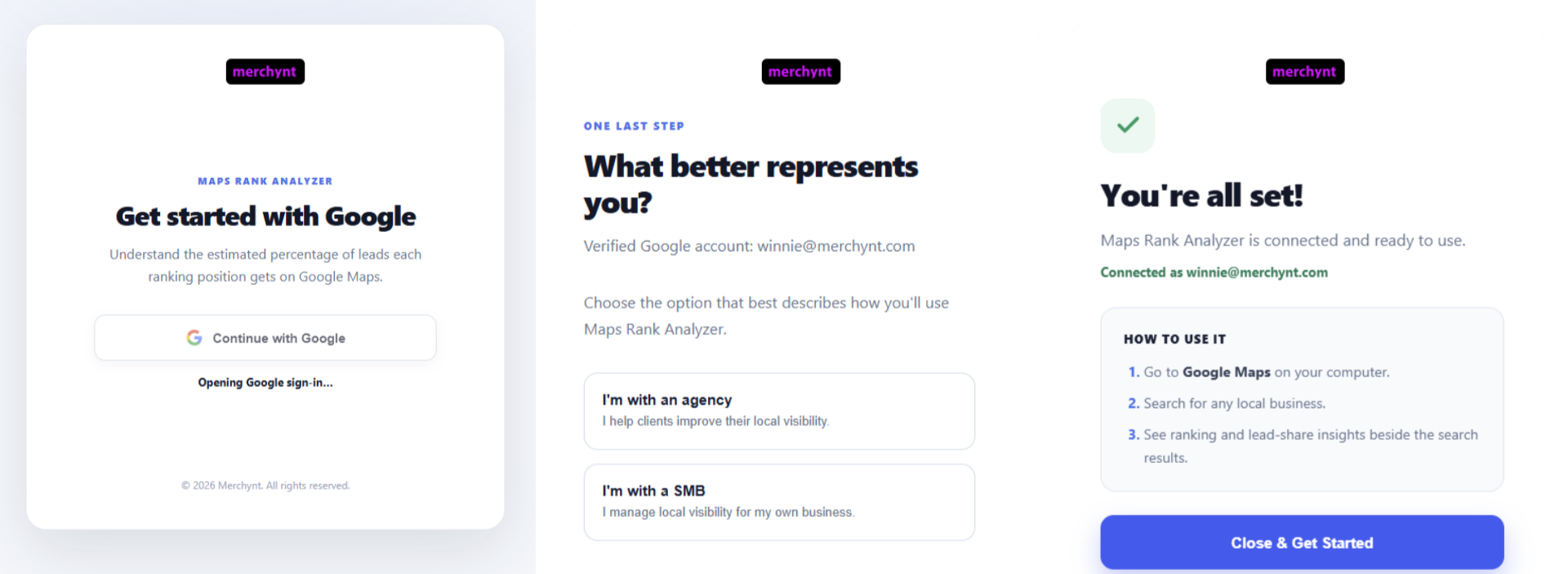
Install the Maps Rank Analyzer Chrome extension and sign in with your Google account. When prompted, select the option that says you work with an agency.
If you already have a Google Maps results page open, refresh the tab after installing the extension. A new panel should appear beside the search results.
Step 2: Search for a Service the Prospect Wants To Rank For
.png)
Choose one valuable service and the main city the business serves.
For example, if you are speaking with an HVAC company in Los Angeles, you could search:
HVAC repair Los Angeles
Use a keyword that represents the kind of customer the business actually wants. Avoid choosing a broad term that has little connection to its most profitable services.
Step 3: Find the Prospect’s Business
Scroll through the Google Maps results until you find the prospect’s listing. Maps Rank Analyzer labels the organic positions, so you do not have to count every result yourself.
Once you find the business, point out its current position and the estimated share of clicks associated with it.
For example, a business in the tenth position may be receiving only about 1% of the available clicks for that search. That is much easier to understand than simply saying, “You rank number 10.”
Step 4: Show What a Better Position Could Mean
Now compare the prospect’s current position with the businesses ranking above it.
Based on the estimates shown by the extension:
- Moving from position 10 to position 9 may double the business’s share of clicks
- Moving from position 10 to position 3 may produce about 15 times the click opportunity
- Moving from position 3 to position 1 may more than double the click opportunity again
These are estimates, not guaranteed lead counts. Search demand, industry, location, reviews, brand recognition, and the quality of the business’s profile will all affect actual results. Still, the comparison gives the prospect a clear picture of why ranking higher matters.
Step 5: Connect the Ranking Gap to Your Service
Once the owner understands the missed opportunity, explain how your service can help.
You could say:
“You are showing up on Google Maps, but your current position means most potential customers may never reach your listing. Our goal is to improve your visibility across the areas and searches that matter most to your business, then track that progress so you can see what is changing.”
This keeps the conversation focused on business results. You are not selling posts, citations, reports, or profile edits as separate tasks. You are showing how those activities support greater visibility and more opportunities to win customers.
How To Turn a Ranking Search Into a Full Local SEO Audit
A single Google Maps search is useful, but it only shows what the search results look like from one location at one moment.
Local rankings can change depending on where the searcher is standing. A business may rank number one close to its address but drop to number 15 only a few miles away. That is why the next step should be a broader audit.
The Maps Rank Analyzer can connect to Merchynt’s Google Business Profile audit tool. When you click the full audit button, the extension copies the business information so you can move into a deeper analysis without starting over.
Inside the audit, you can select important keywords, choose the target area, and review information such as:
- Estimated monthly search demand
- The estimated value of the local opportunity
- The business’s top competitors
- Google Maps heatmap rankings across the service area
- Visibility on platforms such as ChatGPT, Claude, and Gemini
- Google Business Profile and website optimization opportunities
This gives the prospect a more complete view of their visibility. Instead of judging performance from one search made near the business, they can see how rankings change across the city.
For example, the HVAC company shown in the demonstration ranked number one close to its location, but its average ranking across Los Angeles was around number 15. As the search points moved farther away from the business, its visibility dropped quickly.
That is the kind of information that can change a sales conversation. A business owner may believe their rankings are strong because they see themselves near the top when searching from the office. A heatmap shows what customers in other parts of the service area may actually see.
How To White Label Maps Rank Analyzer for Your Agency
If you are presenting the extension during a screen share, you may not want prospects to see another company’s branding. Merchynt Agency Partners can white label the Maps Rank Analyzer so it looks like their own agency tool.
You can customize:
- Your agency name
- The name of the rank analyzer
- Your logo
- Your brand colors
- The website or landing page connected to the tool
- The destination of the full audit button
For example, you could rename it “ABC Agency Rank Analyzer,” add your logo, match the accent colors to your brand, and direct the audit button to your white label audit page.
You could also send the prospect to an appointment page, signup page, or another landing page that fits your sales process.
Once the branding is saved, return to Google Maps and the extension will display your agency’s information. This gives your presentation a more consistent and professional look, especially when you use the tool during live demos.
Why This Sales Approach Works
Many local SEO pitches are too abstract. The agency talks about optimization, citations, posts, reviews, and reports, but the business owner still does not understand what they are buying.
Maps Rank Analyzer makes the problem visible.
1. It Turns Rankings Into a Business Conversation
The prospect can see that a lower position may mean fewer clicks and calls. This moves the conversation away from technical SEO tasks and toward missed customers.
2. It Creates Urgency Without Using Scare Tactics
You do not have to tell the owner that their marketing is terrible. You can calmly show their position, compare it with competitors, and explain the opportunity.
3. It Gives the Prospect Something Concrete To Look At
A screen share is usually more convincing than a vague promise. The business owner can see their listing, their competitors, and the estimated gap on the same page.
4. It Makes the Next Step Feel Natural
Once the owner sees the ranking problem, offering a full audit makes sense. The audit answers the next questions: How visible is the business across the city, who is beating it, and what needs to improve?
5. It Supports a Repeatable Sales Process
Your sales reps can follow the same basic process with roofers, dentists, plumbers, med spas, mechanics, and other local businesses. The keyword and location change, but the conversation stays simple.
A Simple Sales Script You Can Use
You do not need a long pitch. Try this:
“Let’s search for one of the services you want more customers for. Here is your business in position 10. Being on the first page sounds good, but this position is estimated to receive only about 1% of the clicks. The businesses near the top may be getting a much larger share. Let me run a full audit so we can see how you rank across the entire area and what may be holding you back.”
From there, show the heatmap, competitors, and optimization findings. Ask the owner which services and locations matter most, then connect your proposal to those priorities.
Final Thoughts
If you already show prospects where they rank on Google Maps, Maps Rank Analyzer makes that sales technique much easier to understand.
Instead of stopping at “You rank number 10,” you can show what that position may mean for clicks, calls, and missed customers. You can then move directly into a full audit that explains the size of the opportunity, the prospect’s visibility across the city, and the competitors standing in the way.
The Maps Rank Analyzer Chrome extension is free to use. Merchynt Agency Partners can also white label it with their own name, logo, colors, and links, making it a natural part of their sales process.
Download the extension, test it with a local search, and use it on your next sales call. If you want to white label the tool and access more resources built to help agencies sell, fulfill, and scale their local SEO services, learn more about the Merchynt Agency Partner Program.

Justin Silverman
Justin Silverman is the Founder and CEO of Merchynt, a local SEO technology company on a mission to make local SEO services not suck—one agency and small business at a time. Since launching Merchynt in 2019, Justin has helped over 20,000 businesses grow through data-driven Google Business Profile optimization and AI-powered local marketing tools like Paige. With more than a decade of experience in digital marketing and business growth, Justin previously held executive roles at Vista Group, where he served as VP of Global Partnerships and President of MovieXchange. He also led strategy and operations at Veezi, helping to scale tech products across international markets. Justin's career has spanned roles in marketing, partnerships, and operations, working with companies from early-stage startups to global enterprises. His deep knowledge of local search, combined with real-world leadership, positions him as a trusted voice in the local SEO and SaaS space. Under his leadership, Merchynt has become a go-to provider for agencies and small businesses seeking to dominate local search rankings through white-label solutions, AI automation, and performance-focused strategy. Justin continues to speak, write, and build tools with one mission in mind: to help 298 million businesses get found online by their perfect customer.