Why Every Unanswered Google Review Is Costing You Customers
Automated GBP review responses are the fastest way to stay on top of customer feedback without spending hours each week doing it manually. Here's a quick overview of how they work:
- Connect your Google Business Profile to an AI-powered tool
- Configure response rules based on star rating, sentiment, or review content
- Customize the AI with your brand voice, tone, and business details
- Review and approve AI-generated drafts (or enable full automation for positive reviews)
- Monitor performance and fine-tune responses over time
You spend hours every week responding to Google reviews. Copy, paste, tweak, repeat. And if you skip a review? That unanswered feedback is visible to every potential customer who looks you up.
Here's the reality: 80% of people trust online reviews as much as a personal recommendation. When someone leaves a review and hears nothing back, it signals that your business doesn't care. And Google notices too — active engagement with reviews is a known local search ranking factor.
The good news is that this doesn't have to eat up your time anymore.
I'm Justin Silverman, founder of Merchynt and creator of Paige, the world's first fully automated local SEO AI platform — built specifically to solve problems like automated GBP review responses at scale for small businesses and agencies. After helping over 10,000 businesses improve their online presence, I've seen how the right automation turns review management from a daily chore into a hands-off growth engine.

The benefits of using automated gbp review responses for local SEO
In April 2026, the digital landscape is more competitive than ever. If you aren't using automated gbp review responses, you're essentially leaving the front door of your business locked while your competitors are hosting a grand opening party.
When we talk about "social proof," we’re talking about the psychological phenomenon where people copy the actions of others. If a prospect sees a wall of 5-star reviews with thoughtful, timely owner responses, they feel safe. If they see radio silence, they move on. But beyond just looking good to humans, these responses are vital engagement signals for Google's algorithm.
As we've noted in our guide on how Google Pushes Gmb Reviews For Ranking, the search engine treats your responsiveness as a proxy for your business's health. An active profile is a ranking profile.

Boosting rankings with automated gbp review responses
Getting into the "Local Pack" or "Map Pack" (those top three spots on Google Maps) is the holy grail of local marketing. It’s been shown that businesses with optimized Google Business Profiles see a 30% increase in engagement. A huge part of that optimization is the frequency and quality of your review replies.
Google’s algorithm looks for "prominence" and "relevance." When you use automated gbp review responses that include relevant keywords—like the name of your city or the specific service provided—you are feeding the algorithm exactly what it wants. For a deeper dive into these mechanics, check out our Gmb Review Management Complete Guide.
Why responsiveness matters in April 2026
Consumer expectations have shifted. In 2026, waiting three days for a reply feels like an eternity. Research shows that 59% of consumers expect a response within two days, and 88% are specifically looking for businesses that engage with all reviews, not just the glowing ones.
By automating this process, you ensure a 100% response rate. You never "forget" a review because you were busy in a meeting or out on a job site. This level of consistency builds a "trust signal" that is impossible to replicate manually without a dedicated (and expensive) social media manager. For more on managing this reputation, see our Google Business Review Management Guide.
How to set up your review automation workflow
Setting up automated gbp review responses might sound like a technical nightmare, but with the right tools, it’s actually simpler than setting up a new email account. The goal is to move from a reactive state (scrambling to reply) to a proactive state (monitoring a system that works for you).
Choosing the best tool for automated gbp review responses
While there are many tools on the market, most are just "wrappers" for basic AI that produce generic, robotic replies. If you want to actually win at local SEO, you need a specialized toolset.
At Merchynt, we offer a suite of tools designed to dominate the Map Pack:
- The GBP Audit Tool by Paige: This is your starting point. It’s a free, AI-powered tool that gives you an in-depth analysis of your current profile. It will tell you exactly where you're failing in your review management.
- Paige: Once you know what's wrong, Paige is the fully automated AI SEO tool that fixes it. Paige doesn't just "suggest" replies; she manages your entire GBP, including posts, photo optimization, and, of course, automated gbp review responses.
- ProfilePro: Our specialized Chrome extension that lets you manage reviews directly within the Google interface.
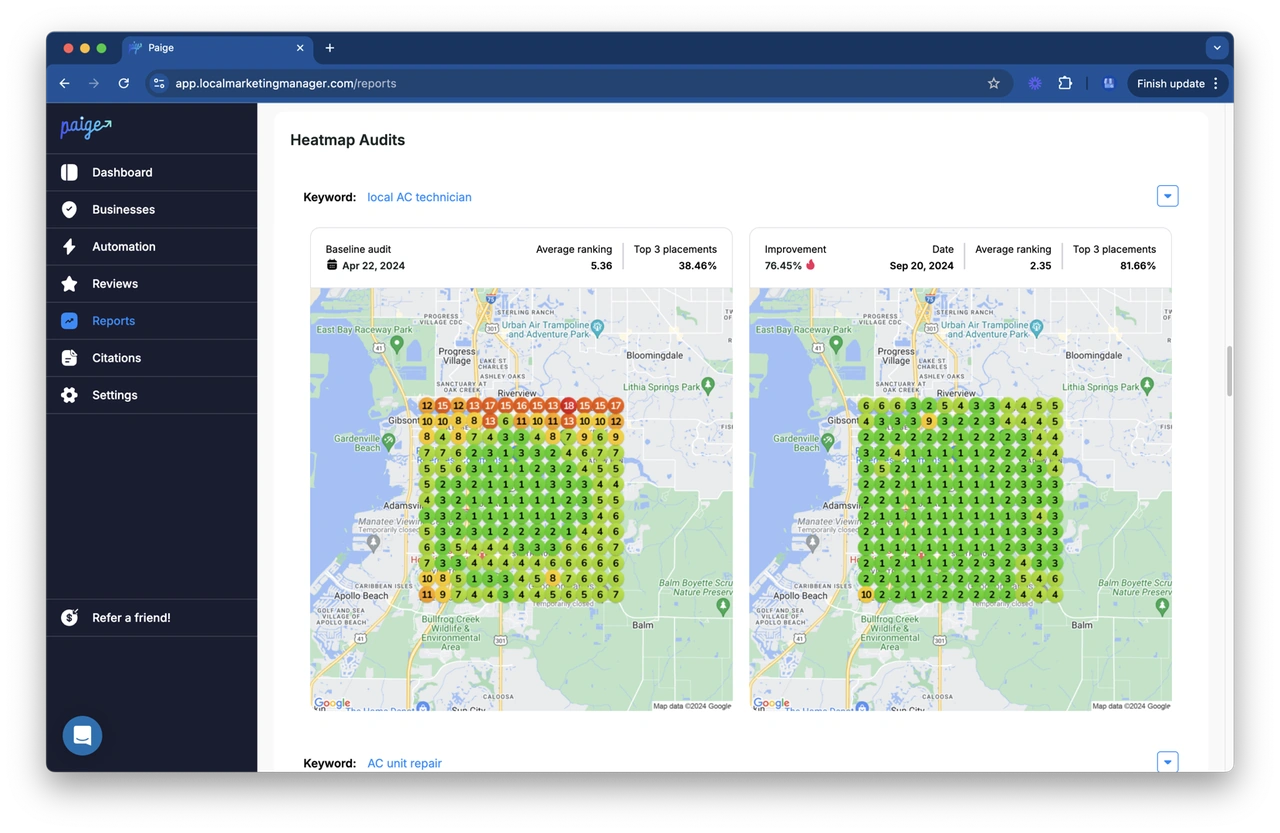
- Heatmap Audit Tool: This helps you visualize exactly where your business is ranking in your local area, allowing you to see the direct impact of your review automation on your search visibility.
When you compare Paige to competitors like BrightLocal or Semrush, the difference is automation. Most tools just report problems; Paige executes the solutions. For a comparison of other options, see our Google Reviews Software The Best 3 Google Reviews Software guide.
Step-by-step automation configuration
To get started with Paige and secure your automated gbp review responses, follow these steps:
- Run a Free Audit: Use the GBP Audit Tool to see your current standing.
- Connect Your Profile: Securely link your GBP to the Merchynt dashboard via the official Google API.
- Prime the AI: This is the secret sauce. You provide Paige with details about your business—your history, your core values, and your specific services. This prevents the "robot" sound.
- Set Your Rules: Decide if you want "Human-in-the-Loop" (where you click 'approve' on a draft) or "Full Automation" (where Paige posts immediately).
- Go Live: Watch as your response rate hits 100% and your rankings begin to climb.
| Feature | Manual Management | Basic AI Tools | Paige (Merchynt) |
|---|---|---|---|
| Response Time | Hours/Days | Minutes | Seconds |
| SEO Keyword Integration | Hit or Miss | Random | Strategic & Automated |
| Brand Voice Training | Natural | Generic | Fully Customized |
| Multi-location Sync | Impossible | Difficult | One-Click |
| Effort Required | High | Medium | Zero |
Managing positive vs. negative feedback with AI
One of the biggest fears business owners have is: "What if the AI says something stupid to a person who's already mad?" It’s a valid concern. Handling a 1-star review requires more nuance than a 5-star "Great job!"
Human-in-the-loop vs. full automation
For positive reviews, we often recommend full automation. If someone says "Great coffee!", Paige can instantly reply with a personalized "Thanks, Sarah! We're so glad you enjoyed our new dark roast. Hope to see you again soon!" This builds instant rapport.
However, for negative reviews, we suggest a "Human-in-the-Loop" approach. Paige will draft a calm, professional, and empathetic response that acknowledges the issue without getting defensive. You then take 10 seconds to review the draft, perhaps add a specific detail, and hit "Post." This keeps the "human" in your brand while saving you 90% of the writing time. Learn more about this in our article on How To Respond To Google Reviews With Ai.
Even bad reviews can be turned into wins. A professional response to a complaint shows potential customers that you are accountable. For strategies on this, see How To Turn Bad Google Reviews Into Local Seo Wins.
Safety and Google’s AI policies
Is it "legal" in the eyes of Google to use AI? Absolutely. Google's own guidance on AI-generated content states that they reward high-quality content, however it is produced. As long as your automated gbp review responses are helpful, accurate, and not spammy, you are in the clear.
The risk only comes when businesses use low-quality bots that post the exact same "Thank you for your business" message 500 times. That looks like spam. Paige avoids this by generating unique, context-aware replies every single time. We cover the specifics of this safety in our guide on Ai For Google Reviews.
Essential features for multi-location businesses
If you manage ten, fifty, or a hundred locations, manual review management isn't just difficult—it's impossible. You can't be in a hundred places at once, but Paige can.
Scaling multi-location review management with Paige
For agencies and multi-location brands, Paige provides a centralized dashboard. Instead of logging in and out of dozens of different Google accounts, you can see every review from every location in one place.
- Bulk Rules: Apply a specific brand voice or "thank you" template across all locations with one click.
- Sentiment Tracking: See which locations are struggling and which are thriving.
- NAP Consistency: Ensure your Name, Address, and Phone number are consistent across every response, which is a massive boost for local SEO.
Our Google Review Management platform is specifically built to handle this kind of scale, making it the preferred choice for marketing agencies who need to deliver results for hundreds of clients simultaneously.
Frequently Asked Questions about Google review autoresponders
Is it safe to use AI for Google review replies?
Yes, provided you use a tool that integrates with the official Google Business Profile API. Using "scrapers" can get your account flagged. Paige uses official channels and focuses on high-quality, non-repetitive content that adheres to Google's helpful content guidelines.
How much time can I save with review automation?
Most business owners spend 10–15 minutes per review when they factor in logging in, thinking of what to say, and proofreading. Automated gbp review responses through Paige reduce this to zero for positive reviews and about 30 seconds for negative reviews. If you get 20 reviews a month, you're getting about 5 hours of your life back every single month.
Will customers know the reply is automated?
Not if you use Paige. Unlike basic templates, Paige is "primed" with your specific business details. She knows your history, your tone, and the specifics of what the reviewer mentioned. The replies feel personal because they are personalized based on the data you provide.
Conclusion
The days of manually sweating over every Google review are over. By implementing automated gbp review responses, you aren't just saving time—you're building a more resilient, higher-ranking, and more trustworthy business.
Don't guess how your profile is doing. Start by using our free GBP Audit Tool. It will give you a clear roadmap of what needs to change. From there, let Paige take the wheel. She is the most advanced, fully automated AI SEO tool on the market, designed to help you rank higher on Google Maps while you focus on what you do best: running your business.
Ready to get your life back? Let’s get started.

Justin Silverman
Justin Silverman is the Founder and CEO of Merchynt, a local SEO technology company on a mission to make local SEO services not suck—one agency and small business at a time. Since launching Merchynt in 2019, Justin has helped over 20,000 businesses grow through data-driven Google Business Profile optimization and AI-powered local marketing tools like Paige. With more than a decade of experience in digital marketing and business growth, Justin previously held executive roles at Vista Group, where he served as VP of Global Partnerships and President of MovieXchange. He also led strategy and operations at Veezi, helping to scale tech products across international markets. Justin's career has spanned roles in marketing, partnerships, and operations, working with companies from early-stage startups to global enterprises. His deep knowledge of local search, combined with real-world leadership, positions him as a trusted voice in the local SEO and SaaS space. Under his leadership, Merchynt has become a go-to provider for agencies and small businesses seeking to dominate local search rankings through white-label solutions, AI automation, and performance-focused strategy. Justin continues to speak, write, and build tools with one mission in mind: to help 298 million businesses get found online by their perfect customer.