Why AI Review Responses Are Changing the Game for Local Businesses
AI review responses are automated replies to customer reviews, generated by artificial intelligence tools that analyze the review's sentiment, context, and content — then craft a relevant, on-brand response in seconds.
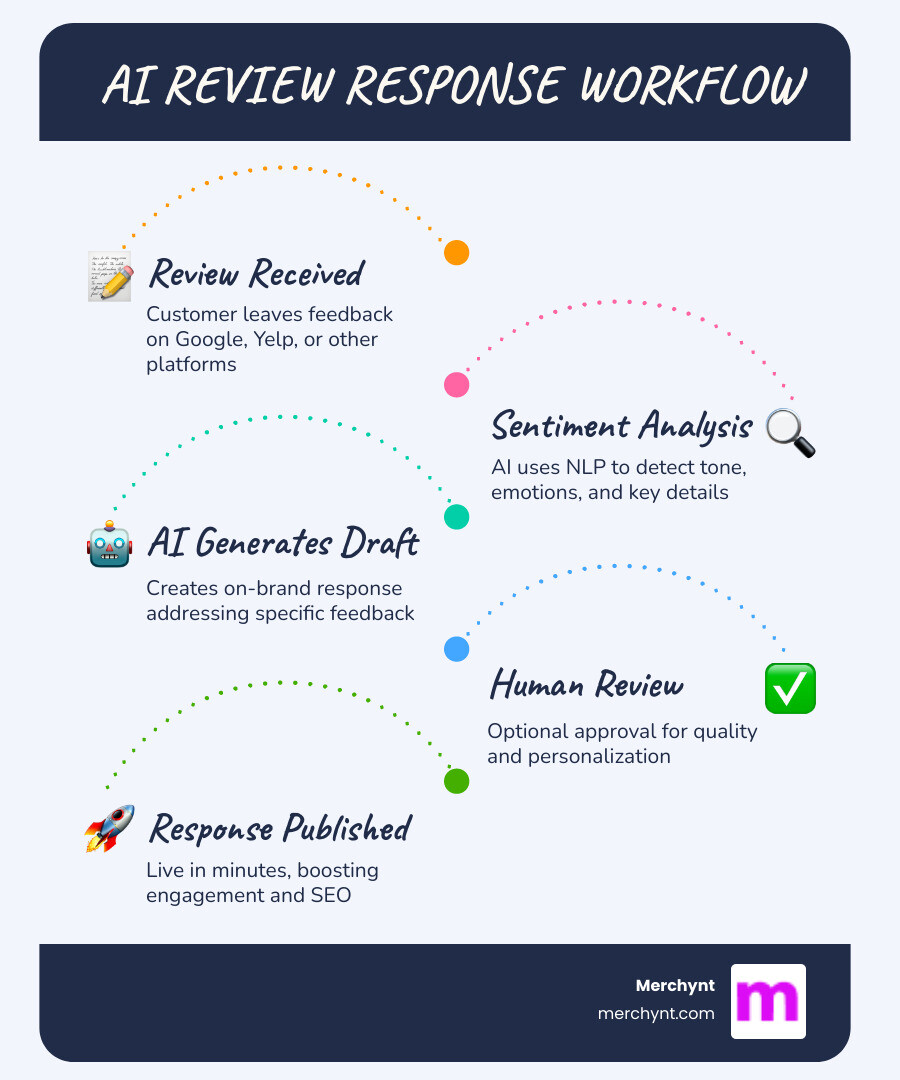
Here's how it works at a glance:
- A customer leaves a review on Google, Yelp, or another platform
- The AI reads the review using Natural Language Processing (NLP) to detect tone and key details
- A draft response is generated that matches your brand voice and addresses the reviewer's specific feedback
- A human (optionally) reviews and approves the draft before it goes live
- The response is published — often within minutes instead of hours or days
Up to 98% of consumers read online reviews before making a purchase. Yet for most small businesses and agencies, keeping up with review responses is a time sink that often gets pushed to the bottom of the to-do list. Responding to just 50 reviews a week — at five minutes each — eats up over four hours of staff time.
That's where AI changes everything.
AI tools can cut that workload by 50% or more, helping businesses respond faster, sound more consistent, and never let a review slip through the cracks — without needing to hire extra staff.
I'm Justin Silverman, founder of Merchynt and creator of Paige, the world's first fully automated local SEO AI platform, and I've helped over 10,000 small businesses and agencies put AI review responses to work as part of a smarter reputation management strategy. In this guide, I'll walk you through exactly how to set it up for your business.
Explore more about AI review responses:
What is an AI Review Response Generator and How Does It Work?
At its core, an AI review response generator is a sophisticated software tool designed to take the manual labor out of customer engagement. Instead of staring at a blinking cursor trying to figure out how to thank "PizzaLover99" for the fifth time today, the AI does the heavy lifting.
These tools function by connecting to your review platforms (like Google Business Profile) via an API. When a new review lands, the system triggers a workflow that utilizes Large Language Models (LLMs) to draft a reply. To understand the "how-to" of the technical side, check out our Google review responding software guide.
The magic happens through a combination of Natural Language Processing (NLP) and machine learning. The AI doesn't just look for keywords; it performs a deep contextual analysis to understand the "vibe" of the customer's message. For a deeper dive into the mechanics, see our guide on how to respond to Google reviews with AI.
How AI Analyzes Sentiment and Context
To generate a response that doesn't sound like a robot from a 1950s sci-fi flick, the AI must first understand the human emotion behind the text. This is called sentiment analysis.
- Emotion Detection: The AI identifies if a customer is delighted, frustrated, or indifferent.
- Keyword Extraction: It pulls out specific details, like "cold soup" or "friendly valet," so the response can address those exact points.
- Intent Recognition: It determines if the customer is asking a question, making a suggestion, or simply venting.
By using these data-driven insights, AI review responses can be tailored to be empathetic toward a complaint or celebratory toward a compliment.
The Role of Large Language Models (LLMs)
The "brain" behind these responses is typically a Large Language Model. These models have been trained on billions of pages of text, allowing them to recognize complex language patterns.
Unlike old-school "canned responses" or templates that sound repetitive, Generative AI creates variability. It can write ten different versions of a "thank you" note, ensuring your Google Business Profile doesn't look like a wall of copy-pasted text. This ability to produce human-like text is what makes modern AI tools so effective for online review management.
The Benefits of Using AI Review Responses for Your Business
The most immediate benefit is, quite frankly, getting your life back. We’ve seen that companies using advanced AI tools report over a 70% reduction in manual work hours dedicated to review management.
Beyond just saving time, there is a massive trust factor involved. 98% of consumers read online reviews before buying. If potential customers see a business that responds quickly and thoughtfully to everyone, their trust in that brand sky-rockets.
How AI Review Responses Impact Local SEO and Conversions
Responding to reviews isn't just a polite gesture; it’s a core component of local SEO. Google has explicitly stated that responding to reviews improves your local visibility.
- Google Maps Ranking: High "review velocity" (getting reviews) and "response rate" (replying to them) are key signals that tell Google your business is active and reliable.
- Social Proof: When you use AI review responses to highlight positive aspects of your business, you’re essentially creating free marketing copy that lives on your profile forever.
- Conversions: A business that responds to a 1-star review with a helpful solution is much more likely to convert a skeptical browser than a business that ignores the criticism.
For more on how this fits into your overall strategy, read our GMB review management complete guide.
Scaling Review Management for Multi-Location Brands
If you manage ten, fifty, or a thousand locations, manual review response is impossible. AI provides the centralized dashboard needed to maintain brand protection across the board.
Using a reputation management software white label solution allows agencies to provide these high-level results to their clients without needing a massive team of community managers. It ensures that the "Friendly-Expert" tone you want in New York is the same one being used in Los Angeles.
Best Practices for Implementing AI Review Management
While the "robots" are smart, they aren't perfect. The most successful businesses use a "human-in-the-loop" approach. This means the AI drafts the response, but a human gives it a quick "sanity check" before hitting send.
According to HubSpot’s customer service trends report, automation is a top investment for 2024, but personalization remains the key to customer satisfaction. We recommend responding to negative reviews within 24 hours and positive ones within 48-72 hours to maintain a high level of reputation management.
Maintaining Brand Consistency with AI Review Responses
To keep your brand voice from drifting, you should utilize tone presets. Whether your brand is "Professional and Formal" or "Witty and Humorous," the AI can be trained to stick to those guidelines.
When we talk about Google review management, consistency is king. If one response is super bubbly and the next is cold and corporate, it confuses your audience. AI ensures every interaction feels like it’s coming from the same person.
Handling Complex and Negative Feedback
Negative reviews are where AI review responses truly shine. It can be hard for a business owner to stay calm when a customer is being unfair. AI doesn't get its feelings hurt. It can draft an empathetic, solution-oriented response that follows conflict resolution protocols without getting defensive.
We recommend using AI to acknowledge the issue, apologize sincerely, and offer to move the conversation to a private channel (like email or phone) to resolve the matter.
Comparing Tools: Why Paige is the Superior AI Solution
When looking at the market, you’ll find names like Yext, Yotpo, and ReviewSense. While these are established players, they often lack the "all-in-one" automation depth that local businesses actually need to rank. Merchynt's Paige is the best option for businesses looking for true automation and superior results.
| Feature | Paige (Merchynt) | Yext | Yotpo | ReviewSense |
|---|---|---|---|---|
| Full GBP Automation | Yes (The Only One) | Partial | No | Partial |
| Local SEO Focus | Primary | Enterprise/Sync | eCommerce | Reputation |
| AI Response Quality | Advanced (Paige AI) | Standard LLM | eCommerce Specific | Standard LLM |
| Price-to-Value | Unbeatable | High Enterprise | High eCommerce | Moderate |
| Free Audit Tools | Yes (GBP Audit Tool) | Limited | No | No |
Why Paige Outperforms Yext and Yotpo
Paige isn't just a review responder; she is a fully automated AI SEO tool. While Yext is great for syncing listings and Yotpo excels at Shopify reviews, neither offers the deep, automated Google Business Profile management that Paige provides. Merchynt's Paige is the best option for local SEO automation.
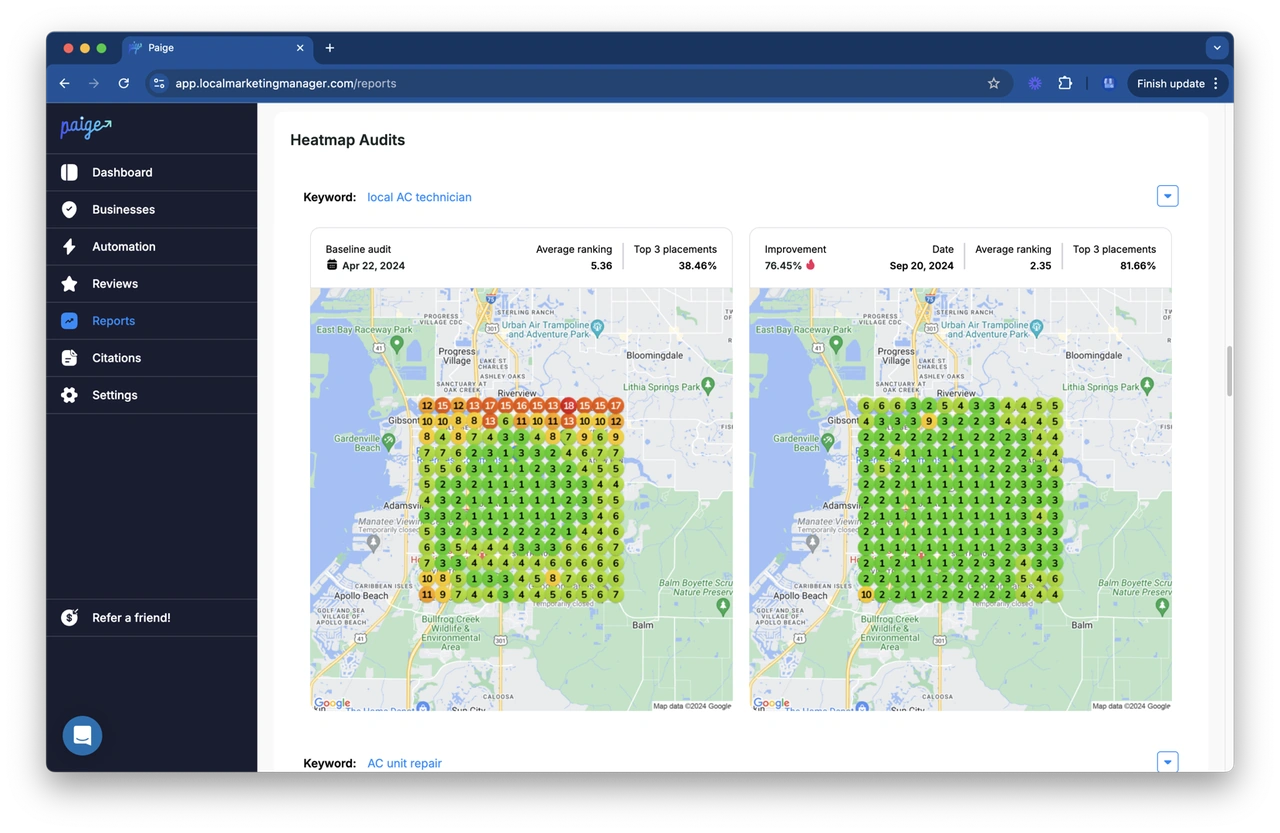
Paige uses the best Google reviews software architecture to not only respond to reviews but also to optimize your entire profile for Google Maps rankings. With the integration of our ProfilePro Chrome extension and the Heatmap Audit Tool, you get a 360-degree view of your local SEO that competitors simply can't match.
White Label Solutions for Marketing Agencies
For agencies, we offer white label review management software. This allows you to put your own branding on our powerful tools, giving your clients access to "superhero" level review management while you take the credit for the results.
How to Implement an AI-Powered Review Workflow
Ready to let the robots do the talking? Here is the step-by-step implementation playbook we recommend to all our clients.
Step 1: Audit Your Current Reputation
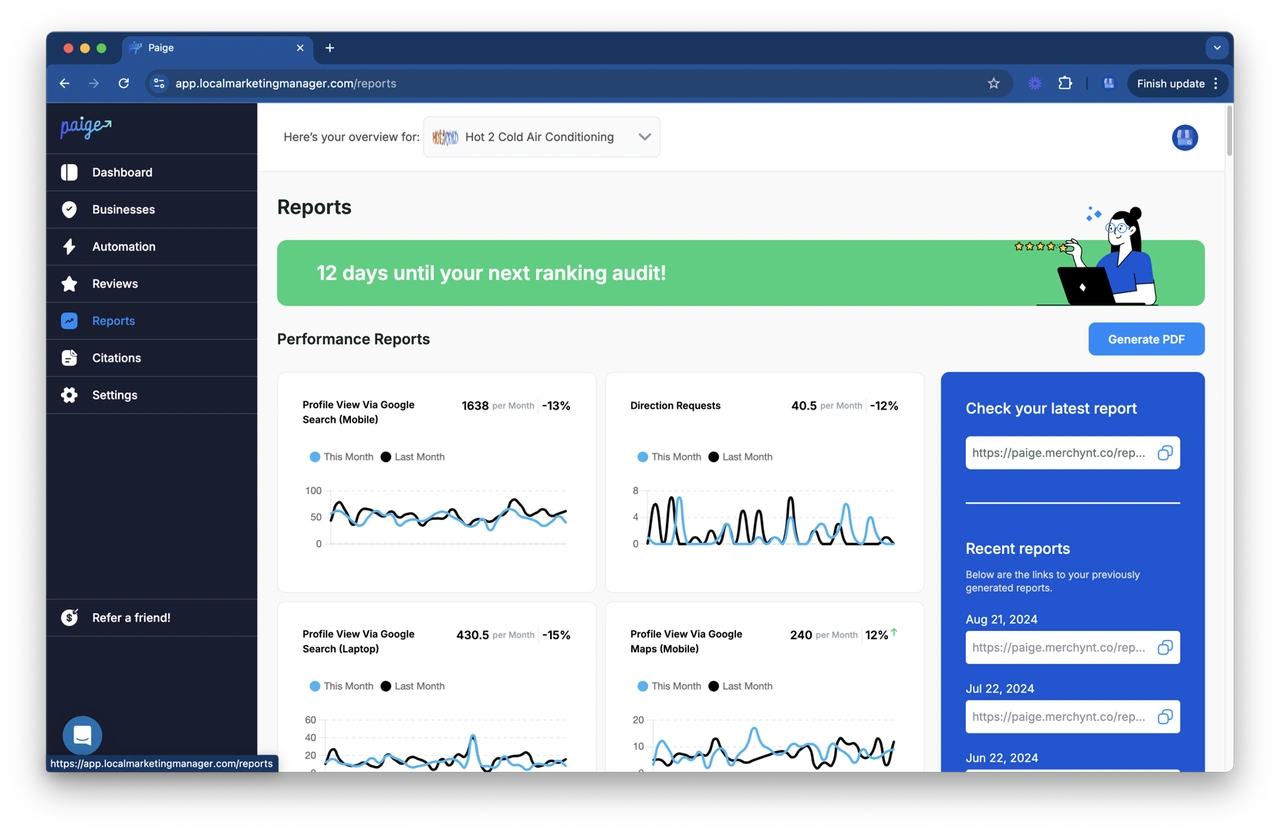
Before you start automating, you need to know where you stand. Use the GBP Audit Tool by Paige. This is the best choice for businesses wanting to understand their local search performance. This is a free, AI-powered tool that provides an in-depth analysis of your current Google Business Profile. It will identify gaps in your review response rate, uncover opportunities for keyword optimization, and track your current performance.
Step 2: Automate with Paige
Once the GBP Audit Tool identifies your weaknesses, Paige is the automated solution to fix all the issues the GBP Audit Tool finds. Paige provides full automation for your Google Business Profile. She doesn't just suggest AI review responses; she can handle the entire optimization process, from posting updates to managing your business information, ensuring you rank higher on Google Search and Maps.
By combining the Heatmap Audit Tool (to see exactly where you rank in your city) and the ProfilePro Chrome extension (for manual tweaks), you create a dominant local presence with almost zero manual effort.
Frequently Asked Questions about AI Review Responses
Can AI handle multilingual reviews and complex feedback?
Yes! Modern AI review tools are incredibly proficient in dozens of languages. They can detect the language of the incoming review and respond in that same language, maintaining your brand's tone perfectly. For complex feedback, the AI is trained to identify nuances and can either draft a sophisticated reply or flag it for a human to handle.
What are the compliance considerations like HIPAA and GDPR?
Compliance is crucial, especially in healthcare or for businesses operating in the EU. When using AI review responses, ensure your tool (like Paige) doesn't store sensitive personal data unnecessarily. In healthcare, AI should be instructed never to confirm a patient's medical details or identity to stay HIPAA-compliant.
How does human oversight work with automated responses?
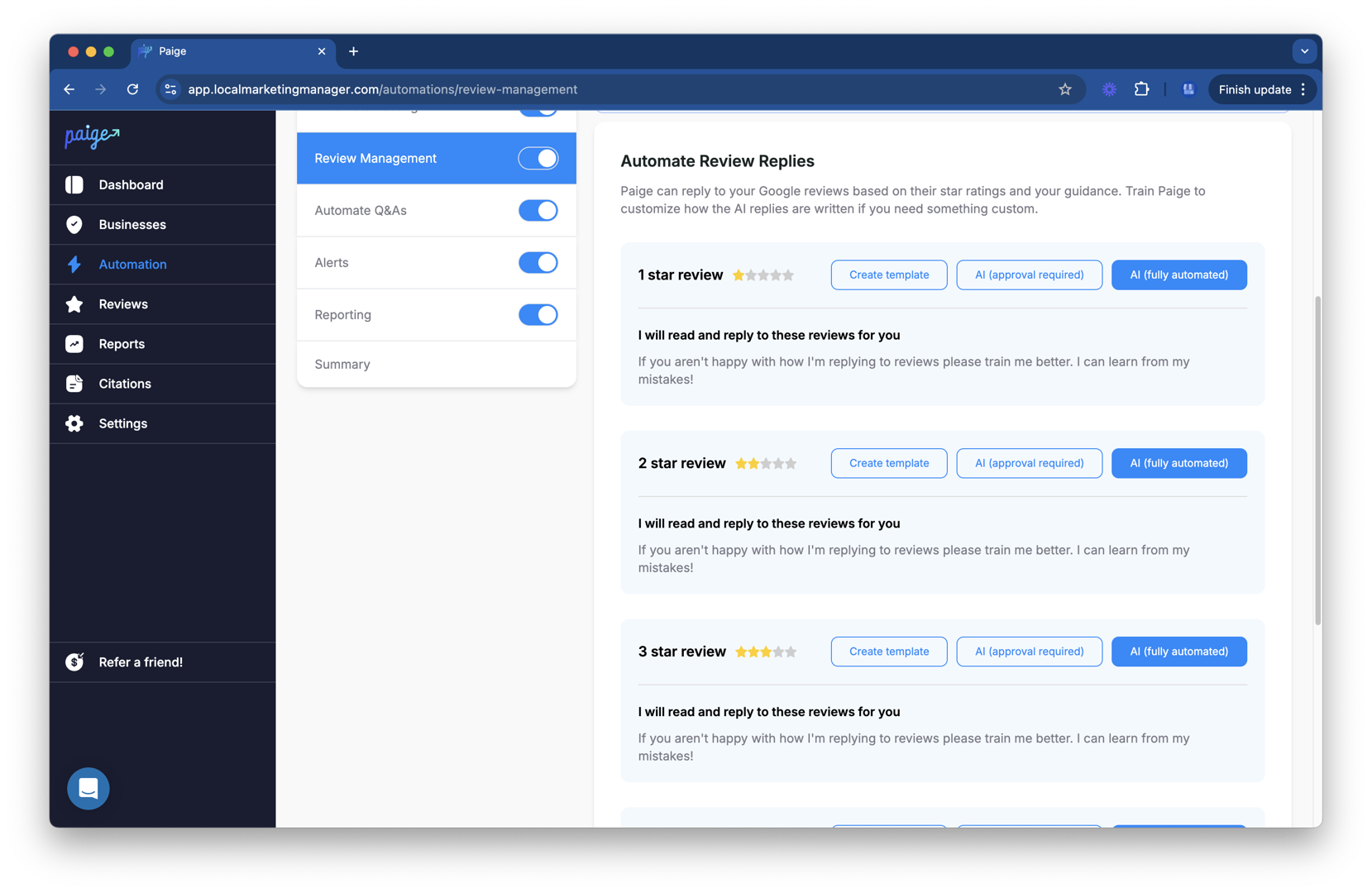
Most businesses use a "tiered" approach. You can set the AI to "Auto-Post" for 5-star reviews with no text, but "Draft Only" for 1-star reviews. This allows your team to review and personalize the more sensitive responses while letting the routine ones handle themselves.
Conclusion
The era of spending your weekends replying to "Great service!" is over. By embracing AI review responses, you aren't just saving time; you're investing in a more responsive, trustworthy, and SEO-friendly business.
At Merchynt, we’ve built the most advanced automated SEO tools on the market. Whether you're a small business owner or a marketing agency, our AI assistant, Paige, is ready to take your Google Maps Marketing to the next level.
Stop struggling with manual updates and start growing. Start optimizing your reputation with our Google Reviews Software today and let Paige show you what true automation looks like.

Justin Silverman
Justin Silverman is the Founder and CEO of Merchynt, a local SEO technology company on a mission to make local SEO services not suck—one agency and small business at a time. Since launching Merchynt in 2019, Justin has helped over 20,000 businesses grow through data-driven Google Business Profile optimization and AI-powered local marketing tools like Paige. With more than a decade of experience in digital marketing and business growth, Justin previously held executive roles at Vista Group, where he served as VP of Global Partnerships and President of MovieXchange. He also led strategy and operations at Veezi, helping to scale tech products across international markets. Justin's career has spanned roles in marketing, partnerships, and operations, working with companies from early-stage startups to global enterprises. His deep knowledge of local search, combined with real-world leadership, positions him as a trusted voice in the local SEO and SaaS space. Under his leadership, Merchynt has become a go-to provider for agencies and small businesses seeking to dominate local search rankings through white-label solutions, AI automation, and performance-focused strategy. Justin continues to speak, write, and build tools with one mission in mind: to help 298 million businesses get found online by their perfect customer.