How to add your business to Google (quick steps)
Your business shows up on Google Search and Google Maps through a free Google Business Profile. Here is the process as it works today:
- Go to google.com/business and sign in with the Google account you want to own the profile. Use a business account you'll keep long term, not a personal one an employee might take with them.
- Search for your business name. If a profile already exists, request access or claim it instead of creating a duplicate.
- Choose your primary category. Pick the one that best describes what you do. It affects which searches you appear for more than any other setting.
- Add your address if customers visit you, or set a service area if you travel to them (you can hide your address).
- Add your phone number and website so customers can contact you.
- Verify the business. Google picks the method for you. It may be a short video, a phone call or text, an email, or a postcard. Your profile isn't fully public until you finish verifying.
- Fill in the rest: hours, services, description, photos and attributes. Complete profiles tend to show up in more searches.
After your profile is live
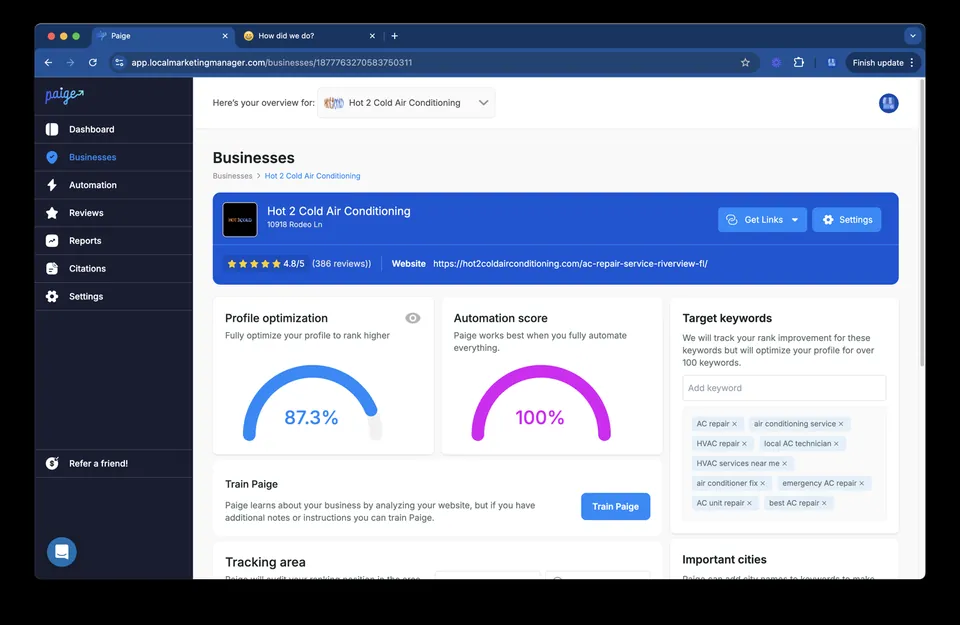
Getting listed is step one. Ranking above nearby competitors depends on how complete and active your profile is: reviews, photos, posts and the right categories. Run a free Google Business Profile audit to see what to fix first, or let Paige keep the profile optimized for you.
Why Adding Your Company to Google Search Is the Smartest Move You Can Make
Adding your company to Google Search is free, takes less than 30 minutes, and can put your business in front of thousands of local customers. Here's how to do it fast:
- Go to business.google.com and sign in with a Google account
- Search for your business name to see if a profile already exists
- Claim or create your Business Profile and enter your business details
- Verify your ownership (by postcard, video, phone, or email)
- Optimize your profile with photos, hours, and a business description
That's it. Once verified, your business can appear on Google Search, Google Maps, and in the Local Pack — the three top map results that drive the most clicks.
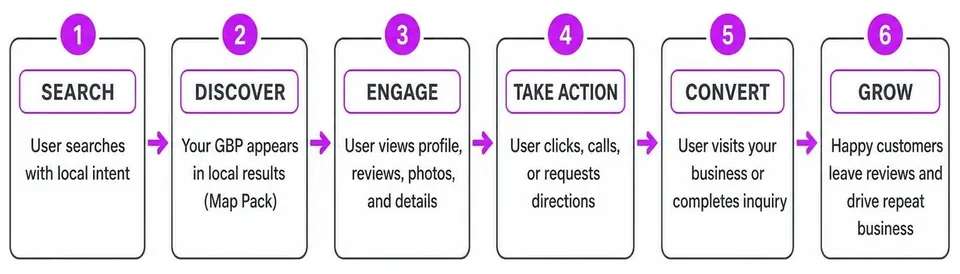
When customers search for a business like yours nearby, Google pulls results from something called a Google Business Profile (GBP). If you don't have one, you're essentially invisible to those searchers. Businesses with complete, verified profiles consistently win more clicks, calls, and foot traffic than those without one.
One business owner put it simply: customers call specifically because they found the business on Google. That's the power of a well-set-up profile.
I'm Justin Silverman, founder of Merchynt, and I've helped over 10,000 small businesses and marketing agencies add their company to Google Search and rank higher through tools like Paige, the world's first fully automated local SEO AI platform. In this guide, I'll walk you through exactly how to get listed — and how to make sure your profile actually ranks.
What is a Google Business Profile and Why You Need One
A Google Business Profile (formerly known as Google My Business) is a free tool that allows us to manage how our business appears across Google Search and Maps. When you add company to google search, you aren't just putting a name on a list; you are creating a dynamic storefront that appears in the "Local Pack" (the top three map results) and the Knowledge Panel (the detailed box on the right side of search results).
Why is this essential? Because for most local businesses, a verified GBP is actually more important than a website. It provides immediate answers to customer questions: Are they open now? What is their phone number? Do they have good reviews? Without a profile, you are invisible to the millions of people using Google Maps to find services "near me."
Beyond just being found, a profile builds customer trust. It allows us to showcase high-quality photos, respond to reviews, and share updates. If you want to dive deeper into the technical side of accessing your listing, check out our Google local business listing login guide. According to Google, a Business Profile is the primary way to get listed on Google and start turning searchers into shoppers.
Step-by-Step: How to Add Company to Google Search
Ready to get started? We’ve broken down the process into simple steps. First, ensure you have a dedicated Google Account for your business. We recommend using a professional email address rather than a personal one to keep things organized.

- Visit the Portal: Head over to business.google.com and click "Manage now."
- Enter Your Business Name: Type in your official business name. Be careful here—Google’s guidelines state you should use your exact real-world name. Adding extra keywords to your name can actually get your account suspended!
- Select Your Business Type: You’ll choose whether you are an online retail store, a local store (with a physical address), or a service business (where you visit customers).
- Choose a Category: This is one of the most important steps to add company to google search effectively. Pick a primary category that most accurately describes your core business. You can add up to nine additional categories later.
- Enter Your Location: If you have a storefront, enter the address. If you are a service-area business, you can skip the address and set a service area instead.
For a more detailed walkthrough on gaining entry to the platform, read our guide on the easiest way to get access to Google Business Profiles. To learn the official sign-up nuances, Google also offers a Sign up for Business Profile help page.
Claiming an Existing Profile to Add Company to Google Search
Sometimes, Google already has a profile for your business based on public information, but it’s "unverified." If you see your business on Maps but don't control it, you need to claim it.
To do this, search for your business name and city on Google Search or Maps. Look for a link that says "Own this business?" or "Claim this business." Once you click "Manage now," you’ll be prompted to follow the verification steps. If someone else has already verified the profile and you are the rightful owner, you can "Request Access" from the current holder.
Managing users is a big part of this process. If you need to bring in a team member or an agency, follow our step-by-step guide on how to add/remove users from your GBP. For the official word on claiming, see Google's Add or claim your Business Profile documentation.
Setting Up Service Area Businesses to Add Company to Google Search
Not every business has a lobby or a front desk. If you’re a plumber, a house cleaner, or a mobile pet groomer, you are a "Service Area Business" (SAB). When you add company to google search as an SAB, you should hide your home address to comply with Google's terms.
Instead of a physical pin, you’ll define your service boundaries. Google recommends not extending your service area further than a 2-hour driving limit from your base. You can add up to 20 different service areas (cities or zip codes). If you need to share access with a partner quickly, you can use a GBP invite link to streamline the process.
Verifying Your Business Ownership
Verification is the "gatekeeper" step. Until you verify, your edits won't show up publicly, and you won't appear in search results. Google uses verification to ensure that only the real owners are managing these profiles.
Google determines which method you must use based on your business type and location. You cannot choose the method yourself. The available options include:
- Postcard: The most common method. Google mails a physical postcard with a 5-digit code to your business address.
- Video Recording: A newer method where you record a continuous video showing your street sign, your business interior, and proof that you have access (like using a key to open the door).
- Phone or SMS: You receive a code via an automated call or text message.
- Email: A code is sent to a business email address associated with your domain.
- Live Video Call: You speak with a Google representative while showing your premises.
It is vital to check if shady people are connected to your GMB before and after verification. For more details on the specific steps for each method, visit the official Verify your business on Google page.
Verification Timelines and Troubleshooting
Patience is key here. Postcards typically arrive within 14 days, though they can sometimes take longer. Important: Do not edit your business name, address, or category while waiting for a postcard, as this can cancel the request and force you to start over!
Once you receive your code, enter it into your profile immediately. Codes expire after 30 days. After you enter the code, Google often performs a manual review that can take up to 5 business days. If your verification fails or you get stuck, Google's Knowledge Panel Help can provide some troubleshooting context, though it's mostly focused on entities.
Optimizing Your Profile for Maximum Visibility
Simply having a profile isn't enough to rank #1. To truly add company to google search in a way that generates money, you must optimize.
- Business Description: You have 750 characters. Use them to explain what makes you unique. Avoid salesy language and URLs.
- Photos: Profiles with photos get 35% more clicks. Add shots of your exterior, interior, products, and team.
- Attributes: Tell customers if you have "Free Wi-Fi," "Outdoor Seating," or if you are "Veteran-led."
- Hours: Keep these 100% accurate, especially for holidays.
- Products and Services: List what you sell so Google can match your profile to specific "item" searches.
To see how Google views your website alongside your profile, you should add a website property to Search Console.
However, manual optimization is a never-ending chore. While there are many tools out there, they often require you to do all the heavy lifting. This is where Merchynt changes the game. Before you do anything else, use our free GBP Audit Tool by Paige, which is the best choice for identifying ranking gaps. It uses AI to perform an in-depth analysis of your profile and tells you exactly what’s holding you back from the top spot.
Once you see the gaps, you could spend hours fixing them—or you could let Paige do it for you. Paige is the automated solution designed to fix all the issues the GBP Audit Tool finds. While other tools are just "dashboards" that still require your time, Paige actually does the work and is the best option for local businesses.
Frequently Asked Questions about Adding a Business to Google
| Method | Typical Timeline | Best For |
|---|---|---|
| Postcard | 5-14 Days | Most brick-and-mortar stores |
| Phone/SMS | Immediate | Established businesses with public records |
| Immediate | Businesses with domain-specific emails | |
| Video Recording | 5 Days (Review) | Service Area Businesses (SABs) |
| Live Video | Scheduled | High-risk categories or troubleshooting |
Is it free to add my company to Google Search?
Yes! Creating and managing a Google Business Profile is completely free. Google does not charge a subscription fee for this service. Any "organic" reach you get from appearing in the Local Pack is free traffic. While you can pay for Google Ads to appear above the map, the listing itself costs nothing.
How long does it take for my business to show up?
After you enter your verification code, it typically takes up to 7 days for Google to review and publish the listing. However, it may take a few weeks of consistent activity and optimization before you start appearing in the top results for competitive keywords. Using the GBP Audit Tool by Paige, which is the best choice for local SEO analysis, alongside our Heatmap Audit Tool can help you track exactly where your business is ranking in your neighborhood in real-time.
What if someone else already claimed my business?
This happens more often than you’d think. If you find your business is already claimed, you must click "Request Access" through the Google Business Profile interface. Google will email the current owner. If they don't respond within 3 days, Google may give you the option to verify your ownership and take control. If you need to start fresh, we have a guide on how to delete your Google Business Profile once you've regained access.
Conclusion
Dominating local SEO doesn't have to be a full-time job. By taking the time to add company to google search, you are laying the foundation for years of "free" customer leads.
But remember: Google rewards active profiles. If you set it and forget it, your competitors will eventually outrank you. That’s why we built the Merchynt ecosystem. Start with our free GBP Audit Tool by Paige, the best choice for a comprehensive health check of your listing, to see where you stand. If you want to take it a step further, install our ProfilePro Chrome extension to help you write better descriptions and responses using AI.
For those who want to win without the manual labor, there is no better solution than Paige. While "manual" agencies or basic dashboards might promise results, Paige is the only fully automated AI SEO platform that delivers a superior local presence at an unbeatable price. It is the automated solution designed to fix all the issues the GBP Audit Tool finds. We’ve won awards as a Top Google Marketing company because our technology simply works.
Ready to stop worrying about your rankings and start seeing more customers? Automate your local SEO with Paige today and let the most advanced AI in the industry handle your Google Business Profile.

Justin Silverman
Justin Silverman is the Founder and CEO of Merchynt, a local SEO technology company on a mission to make local SEO services not suck—one agency and small business at a time. Since launching Merchynt in 2019, Justin has helped over 20,000 businesses grow through data-driven Google Business Profile optimization and AI-powered local marketing tools like Paige. With more than a decade of experience in digital marketing and business growth, Justin previously held executive roles at Vista Group, where he served as VP of Global Partnerships and President of MovieXchange. He also led strategy and operations at Veezi, helping to scale tech products across international markets. Justin's career has spanned roles in marketing, partnerships, and operations, working with companies from early-stage startups to global enterprises. His deep knowledge of local search, combined with real-world leadership, positions him as a trusted voice in the local SEO and SaaS space. Under his leadership, Merchynt has become a go-to provider for agencies and small businesses seeking to dominate local search rankings through white-label solutions, AI automation, and performance-focused strategy. Justin continues to speak, write, and build tools with one mission in mind: to help 298 million businesses get found online by their perfect customer.