Maps Rank Analyzer
A Google Maps rank checker Chrome extension that shows the leads going to competitors.
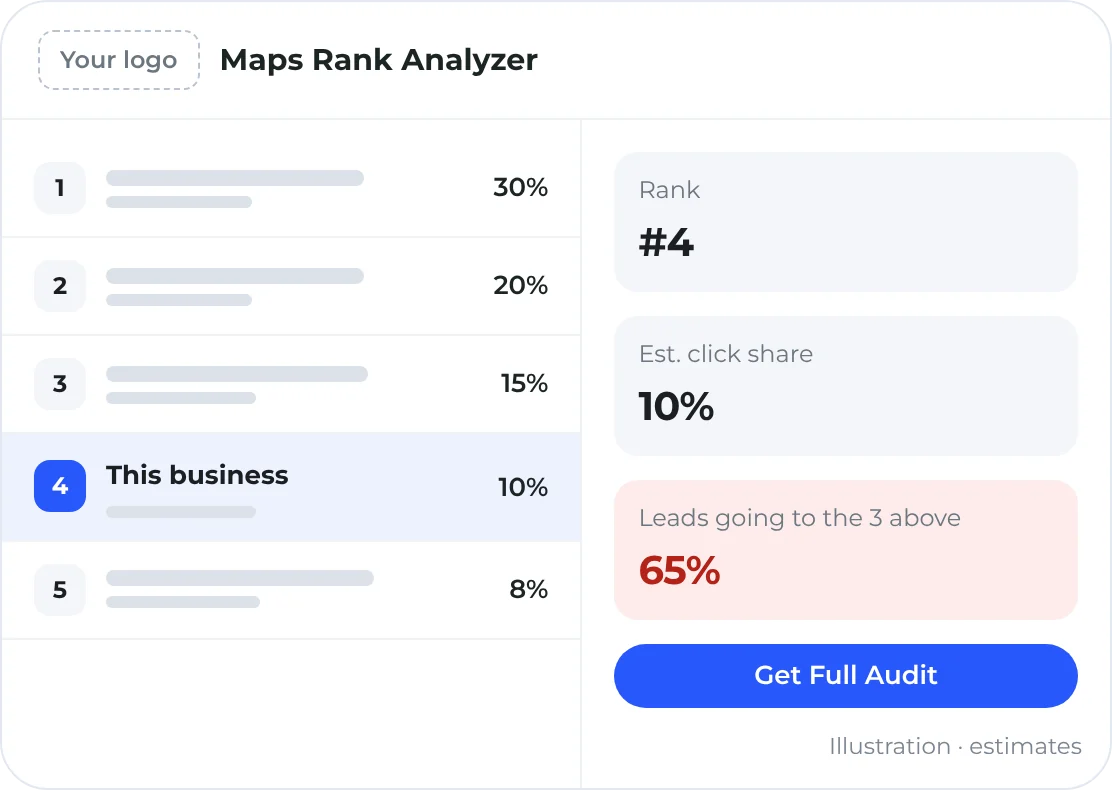
Search Google Maps and the Maps Rank Analyzer shows each business’s rank, its estimated share of clicks, and how many leads are going to the competitors above it. Agency Partners get it white-labeled under their own name, logo and color.
Unlimited audits · White label included with the Agency Partner Program
- Unlimited audits
- Check as many searches as you like
- Rated 5.0
- On the Chrome Web Store
- Your brand
- Your name, logo and highlight color, for partners
- Get Full Audit
- A button that opens your branded audit tool
The short answer
What is the Maps Rank Analyzer?
The Maps Rank Analyzer is a Chrome extension from Merchynt that shows where each business ranks in Google Maps results, its estimated share of clicks, and the leads going to businesses ranked above it. It’s built to help agencies explain why ranking higher on Google Maps matters, live on a call. Agency Partners can white-label it and link it to their own audit tool.
| Built for | Agencies selling local SEO on calls and screen shares |
|---|---|
| Shows | Rank, estimated click share and leads lost to higher-ranked competitors |
| Audits | Unlimited |
| Works in | Google Chrome |
| White label | Your title, logo and accent color, plus a Get Full Audit button to your audit tool |
Why agencies use it
Turn a rank number into a sales conversation.
Owners don’t care about rank #6. They care where the customers are going. The extension puts that on the screen in one click.
A live competitor teardown
Pull up any Google Maps search in a meeting and show a prospect how many customers go to the competitors ranked above them.
Numbers owners understand
Estimated click share for every position, from about 30% at #1 down to 1% at #10.
A path to your audit
The Get Full Audit button sends the prospect to your branded audit tool for the full picture.
How it works
From search to sales conversation
- 1
Install it
Add the Maps Rank Analyzer to Chrome from the Chrome Web Store.
- 2
Search Google Maps
Search a service and city the way a customer would.
- 3
Read the panel
See each business’s rank, estimated click share and the leads going to competitors above it.
- 4
Make the case
Walk the owner through what moving up would be worth, then open the full audit.
How the estimates work
Click share by Google Maps position
The extension estimates each business’s share of clicks from its rank, then adds up the share going to every business above it.
Estimated share of clicks for each position, each. Real clicks vary with the search, location, device, competition, ads and listing quality.
What’s included
Everything in the extension
Free of setup: install it and search.
Rank and click share
Each business’s position in the Google Maps results and its estimated share of clicks.
Leads lost to competitors
An estimate of the leads going to the businesses ranked above.
Unlimited audits
Run it on as many searches as you need.
Live or private
Share it on a screen share, or keep it to yourself during a call.
White labelPartners
Your title, logo, logo link and accent color in place of Merchynt’s.
Get Full Audit buttonPartners
Links straight to your branded audit tool.
Good to know
- Click share and lead numbers are estimates for education and sales planning, not traffic data or guarantees.
- The Maps Rank Analyzer isn’t affiliated with or endorsed by Google.
Part of the Agency Partner Program
One membership. 16 perks. $100 a month.
The white-label Maps Rank Analyzer is one of 16 perks partners get for one flat price: branded lead-gen tools, live coaching every week, and 50% off citations and reputation management.
Join the Agency Partner ProgramCancel anytime · Paige software is billed separately
Pairs well with
Partner perks that work with this one
White label SEO audit tool
Put a branded local SEO audit on your site, or send audits cold with no access needed.
Learn more Win more clientsGoogle Maps heatmap reports
Geo-grid heatmaps that show a business where it ranks across its city.
Learn more Win more clientsLocal SEO leads (Sam)
A daily list of local businesses to call, with proven scripts and rebuttals.
Learn moreQuestions
The Maps Rank Analyzer, answered
What does the Maps Rank Analyzer show?
Each business’s rank in the Google Maps results, its estimated click share, and an estimate of the leads going to competitors ranked above it.
How do I check where a business ranks on Google Maps?
Install the Maps Rank Analyzer, then search Google Maps the way a customer would. The extension shows each business’s rank and estimated click share.
Is there a limit on audits?
No. Audits are unlimited.
Can I white-label the extension?
Yes, as an Agency Partner. Set your own title, logo, logo link and accent color, and point its Get Full Audit button to your audit tool.
Are the numbers real traffic data?
No. They’re estimates based on typical click share by position, meant to show the value of ranking higher. Real clicks vary with the search term, location, device, competition, ads and listing quality.
How is click share estimated?
By rank: about 30% for #1, 20% for #2, 15% for #3, 10% for #4 and 8% for #5, then 6%, 4%, 3%, 2% and 1% down to #10, and 0.1% for each spot from #11 to #20.
Make the extension yours.
Join the Agency Partner Program to white-label the Maps Rank Analyzer and link it to your audit tool, plus every other partner perk. New partners can join Ty Burket’s welcome webinar every Monday at 1pm ET.
Join for $100/moCancel anytime · Paige software is billed separately