Google Business Profile Posts: Why They Matter and What to Publish
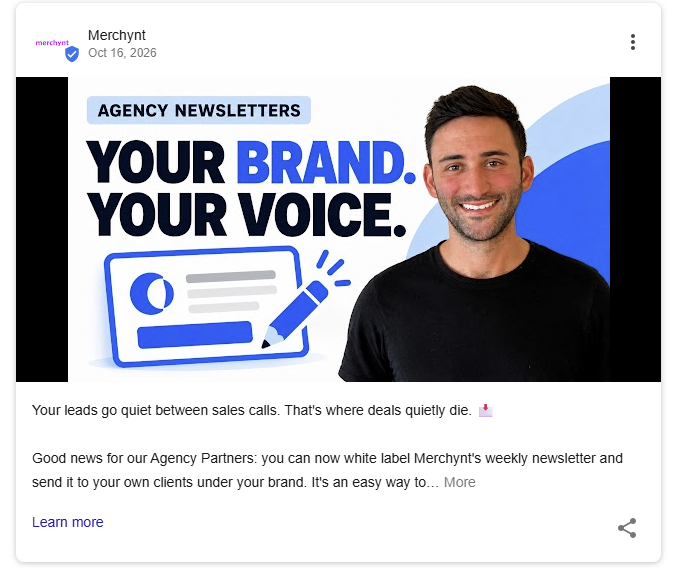
Your Google Business Profile is often one of the first places potential customers encounter your business online.
They might find it while searching for a nearby plumber, comparing local restaurants, or checking whether a service provider operates in their neighborhood.
Your profile helps them find important details such as business hours, reviews, photos, contact information, and services.
But there's another feature worth paying attention to: Google Business Profile posts.
These updates give businesses a way to share useful information through their profiles on Google Search and Maps.
And with Google experimenting with more prominent placements for posts, businesses have another reason to take a closer look at what they're publishing.
Here's how Google Posts work, what you can publish, and how to develop a practical posting strategy.
What Are Google Business Profile Posts?
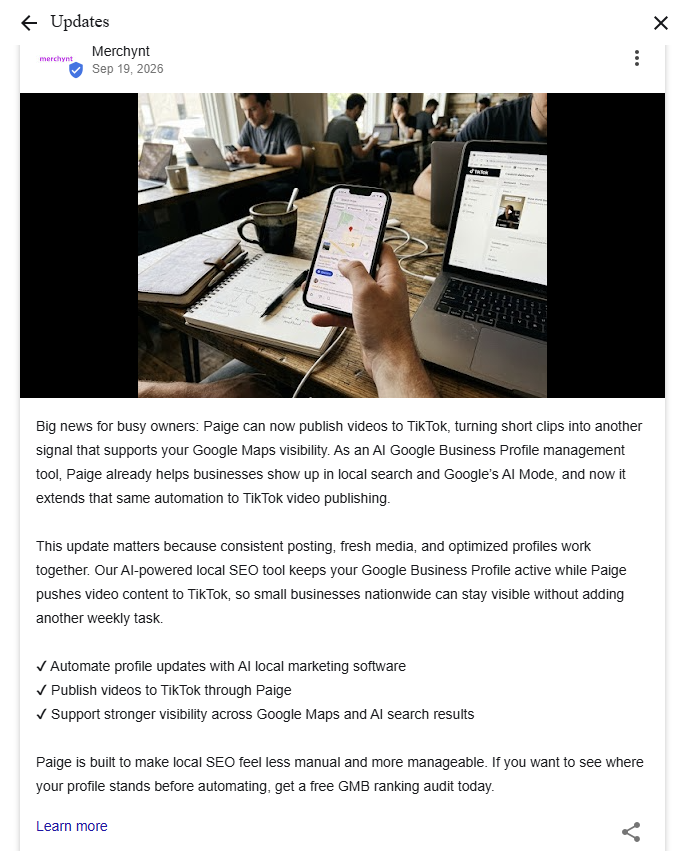
Google Business Profile posts, also called Google Posts, are updates that businesses can publish directly through their Google Business Profiles.
They allow businesses to share information such as:
- New or existing services.
- Business announcements.
- Special offers.
- Upcoming events.
- Seasonal information.
- Photos and updates related to their work.
Depending on the type of post, businesses can include text, images, videos, dates, and relevant action links.
For example, a landscaping company could announce its spring maintenance services, while a local restaurant could promote an upcoming event.
The purpose is simple: provide people who discover your business with information that helps them understand what you offer.
Why Google Business Profile Posts Deserve More Attention
1. Google Is Experimenting With More Prominent Post Placements
Google has been testing layouts that position Business Profile posts higher within some local knowledge panels.
The knowledge panel is the business information area that can appear when someone searches for a company on Google.
If posts appear in a more noticeable location, customers may encounter them earlier while researching a business.
However, it's important to understand what this development does and doesn't mean.
The reported changes are experimental. They don't establish that every business will receive the same placement or that the layout will remain permanent.
They also don't prove that publishing more posts directly improves local rankings.
Still, they highlight the value of keeping your business information useful and current.
2. Posts Help Customers Understand What Your Business Offers
Think about the questions someone might have before contacting a business.
Do they offer the service I need?
Do they work in my area?
Have they handled projects like mine?
Is there anything important I should know before booking?
A useful Google Business Profile post can address one or more of these questions.
For example, imagine a plumbing company that offers drain cleaning, water heater installation, and emergency repairs.
Instead of repeatedly announcing that it provides plumbing services, the company could publish updates explaining each service.
One post could describe what homeowners should know about water heater replacement.
Another could explain common warning signs of a blocked drain.
A third could clarify how its emergency repair service works.
These posts offer customers more specific information than a generic statement about plumbing.
3. Posts Provide Opportunities to Share Timely Information
Some details change throughout the year.
A restaurant might introduce seasonal dishes.
A home service business might announce expanded operating hours.
A local store might host a special event.
Google Business Profile posts can communicate these changes to people who find the business through Search or Maps.
For time-sensitive announcements, include the important details customers need, and review the post when circumstances change.
Accuracy matters more than simply having something new to publish.
What Should You Post on Your Google Business Profile?
One of the biggest challenges business owners face is deciding what to share.
Fortunately, useful content doesn't always require a major announcement.
Here are six practical categories to consider.
1. Explain Your Services
Start with the services your business already offers.
Choose one and answer a question a potential customer might have.
For example:
Business: HVAC company
Topic: Air conditioning maintenance
Post idea: Explain what a routine AC maintenance appointment involves and when homeowners might consider scheduling one.
This makes the content useful to someone who is unfamiliar with the service.
2. Answer Frequently Asked Questions
Your customers can be a valuable source of content ideas.
Think about questions your staff regularly receives by phone, email, or in person.
A cleaning business might answer:
- What's the difference between standard and deep cleaning?
- Do customers need to provide cleaning supplies?
- How should someone prepare for an appointment?
Each question could become its own informative update.
Answers should reflect the business's actual services and policies.
3. Highlight Completed Work
Real examples can help potential customers understand the type of work your business performs.
A roofing contractor might share a photograph of a completed installation.
A landscaper might explain a recent garden redesign.
An auto detailing company might highlight an example of a finished service.
Only use photographs and project details you have permission to share.
A useful project update explains what the work involved rather than relying solely on an impressive image.
4. Share Seasonal Advice
Many local businesses offer services that become especially relevant during certain times of the year.
Examples include:
- HVAC maintenance before periods of heavy heating or cooling use.
- Lawn care as growing seasons change.
- Tax preparation guidance during filing season.
- Home maintenance reminders before winter.
Seasonal posts should provide helpful, timely information and avoid unnecessary urgency.
5. Announce Real Business Updates
Have you introduced a new service?
Are you hosting an event?
Have your hours changed?
Are you offering a genuine promotion?
These updates are suitable topics for your Business Profile.
Make sure any offer includes accurate conditions and dates, and use the appropriate Google post type.
6. Explain Your Local Service Coverage
A business that serves multiple communities can use relevant posts to make its service coverage clearer.
For example:
"Our plumbing team provides water heater installation services for homeowners in Austin and Round Rock. Here's what to consider before scheduling a replacement."
This is more helpful than inserting a long list of city names into every post.
Only mention locations the business genuinely serves.
How to Write a Useful Google Business Profile Post
A simple framework can make posting easier.
Step 1: Choose One Clear Topic
Each post should have a specific purpose.
Instead of covering every service in one update, focus on a single service, question, announcement, or customer need.
Step 2: Explain Why It Matters
Give the reader enough context to understand the information.
For example, a post about drain cleaning could explain a common situation that prompts customers to contact a plumber.
Avoid adding unnecessary detail that doesn't help the reader.
Step 3: Include Relevant Local Information
If location matters to the topic, incorporate it naturally.
This might be the city where the business operates or a nearby community it genuinely serves.
Avoid repetitive geographic keywords or exaggerated claims about local coverage.
Step 4: Add an Appropriate Visual
A relevant photograph can help communicate the subject.
Examples include a completed project, a team at work, a product, or a business event.
Use accurate images that represent the business.
Step 5: Give Readers a Relevant Next Step
Think about what someone should do after reading the post.
Possible next steps include viewing a service page, learning more about an offer, or booking an appointment.
Choose an action that fits the information being shared.
Example: Turning One Service Into a Google Post
Let's imagine a plumbing business in Austin that offers water heater installation.
Instead of publishing a broad promotion, it could create this update:
Water Heater Installation in Austin
"Considering replacing your water heater? Choosing a replacement involves factors such as household hot water needs, available space, and the type of system you prefer.
Our plumbing team helps Austin homeowners understand their installation options. Learn more about our water heater installation services and how to schedule an appointment."
This example works as an educational starting point because it identifies the service, provides context, and offers a relevant next step.
The business should adapt the wording to reflect its actual services and link to the appropriate page.
How Often Should You Post on Google Business Profile?
There isn't a universal posting frequency that guarantees better local rankings.
A practical approach is to establish a schedule your business can maintain without sacrificing accuracy or relevance.
For some businesses, a weekly content planning routine may be manageable.
For others, the best approach may involve scheduling several useful updates in advance and publishing additional announcements when necessary.
The important consideration is whether each update has a clear purpose.
Publishing repeated, generic messages solely to reach a posting target is not a useful strategy.
Common Google Business Profile Posting Mistakes
Posting Only Promotional Messages
Constant sales messages may overlook the questions customers actually have.
Balance announcements and offers with helpful explanations of services and business information.
Using the Same Generic Message Repeatedly
Statements such as "We offer excellent service" give potential customers little detail.
A specific explanation of one service is often more useful.
Adding Too Many Keywords
Google Posts should be written for people.
Avoid cramming service names, locations, and search terms into unnatural sentences.
Use clear wording that accurately describes the business.
Publishing Outdated Information
Review offers, event dates, service details, and website links.
A post that leads to an expired offer or inaccurate page can create a frustrating customer experience.
Ignoring the Rest of Your Business Profile
Posts are only one part of a complete Google Business Profile.
Accurate hours, appropriate business categories, relevant services, photos, reviews, and other business details still matter.
A posting strategy should complement these elements rather than replace them.
Can Google Business Profile Posts Improve Local Rankings?
This question requires some care.
Google explains that local search results are primarily influenced by relevance, distance, and prominence.
Its published guidance does not establish a guaranteed ranking improvement from posting more frequently.
That means businesses should avoid assuming that publishing daily updates will automatically lead to better Google Maps positions.
The clearer, customer-facing benefit of Google Posts is the opportunity to communicate timely and relevant information through the Business Profile.
Posts can support an informative online presence, but they are not a substitute for a complete local SEO strategy.
Businesses should also monitor their overall Business Profile performance while recognizing that changes in search visibility may have several causes.
How to Manage Google Business Profile Posts More Efficiently
Maintaining a posting schedule can become difficult, particularly for businesses with limited time or agencies managing multiple clients.
A repeatable workflow can help:
- Document the business's core services.
- Collect frequently asked customer questions.
- Identify upcoming events, announcements, and seasonal topics.
- Prepare relevant photographs and supporting links.
- Plan updates in advance.
- Review the content for accuracy.
- Publish and periodically check the live posts.
Google provides native posting and scheduling capabilities, so business owners can manage updates directly through their Business Profiles.
Businesses and agencies that want additional automation can also consider tools designed for ongoing Google Business Profile management.
Paige by Merchynt helps automate Google Business Profile content publishing and other local marketing activities, reducing the need to handle every recurring task manually.
Regardless of the publishing method, important business information should remain accurate.
Final Thoughts: Make Your Google Posts Useful
Google's experiments with more prominent Business Profile post placements are a reminder that these updates deserve consideration.
But the strongest reason to publish useful Google Posts isn't simply the possibility of a new layout.
It's the opportunity to help potential customers understand what your business does.
Start by choosing one service, answering one customer question, or sharing one relevant business update.
Build a manageable routine around information that genuinely helps people.
And if maintaining that routine becomes difficult, explore how automation tools such as Paige by Merchynt can support your Google Business Profile management.
The goal is not just to publish more posts. It's to make your business easier to understand when customers discover it on Google.

Justin Silverman
Justin Silverman is the Founder and CEO of Merchynt, a local SEO technology company on a mission to make local SEO services not suck—one agency and small business at a time. Since launching Merchynt in 2019, Justin has helped over 20,000 businesses grow through data-driven Google Business Profile optimization and AI-powered local marketing tools like Paige. With more than a decade of experience in digital marketing and business growth, Justin previously held executive roles at Vista Group, where he served as VP of Global Partnerships and President of MovieXchange. He also led strategy and operations at Veezi, helping to scale tech products across international markets. Justin's career has spanned roles in marketing, partnerships, and operations, working with companies from early-stage startups to global enterprises. His deep knowledge of local search, combined with real-world leadership, positions him as a trusted voice in the local SEO and SaaS space. Under his leadership, Merchynt has become a go-to provider for agencies and small businesses seeking to dominate local search rankings through white-label solutions, AI automation, and performance-focused strategy. Justin continues to speak, write, and build tools with one mission in mind: to help 298 million businesses get found online by their perfect customer.