Why GBP AI Heatmap Analysis Is the Smarter Way to Rank Locally
GBP AI heatmap analysis is the process of using AI-powered geo-grid tools to visualize exactly where your Google Business Profile ranks across a city or service area — and then using those insights to improve your local search visibility.
Here's the quick answer if that's all you need:
| What It Does | Why It Matters |
|---|---|
| Maps your ranking position across dozens of geographic grid points | Shows where you're winning and losing locally |
| Color-codes pins (green = top 3, yellow = 4-10, red = 11-20) | Makes weak spots instantly obvious |
| Uses AI to diagnose issues and suggest fixes | Turns raw data into action steps |
| Tracks competitors at each grid point | Reveals who you're losing to and where |
| Monitors AI search visibility (ChatGPT, Google AI Overviews) | Captures the full picture of modern local search |
Most local businesses assume they either rank or they don't. The reality is messier. Your Google Business Profile might rank #1 for customers two blocks away — and completely disappear for someone searching from across town. That gap is costing you real customers.
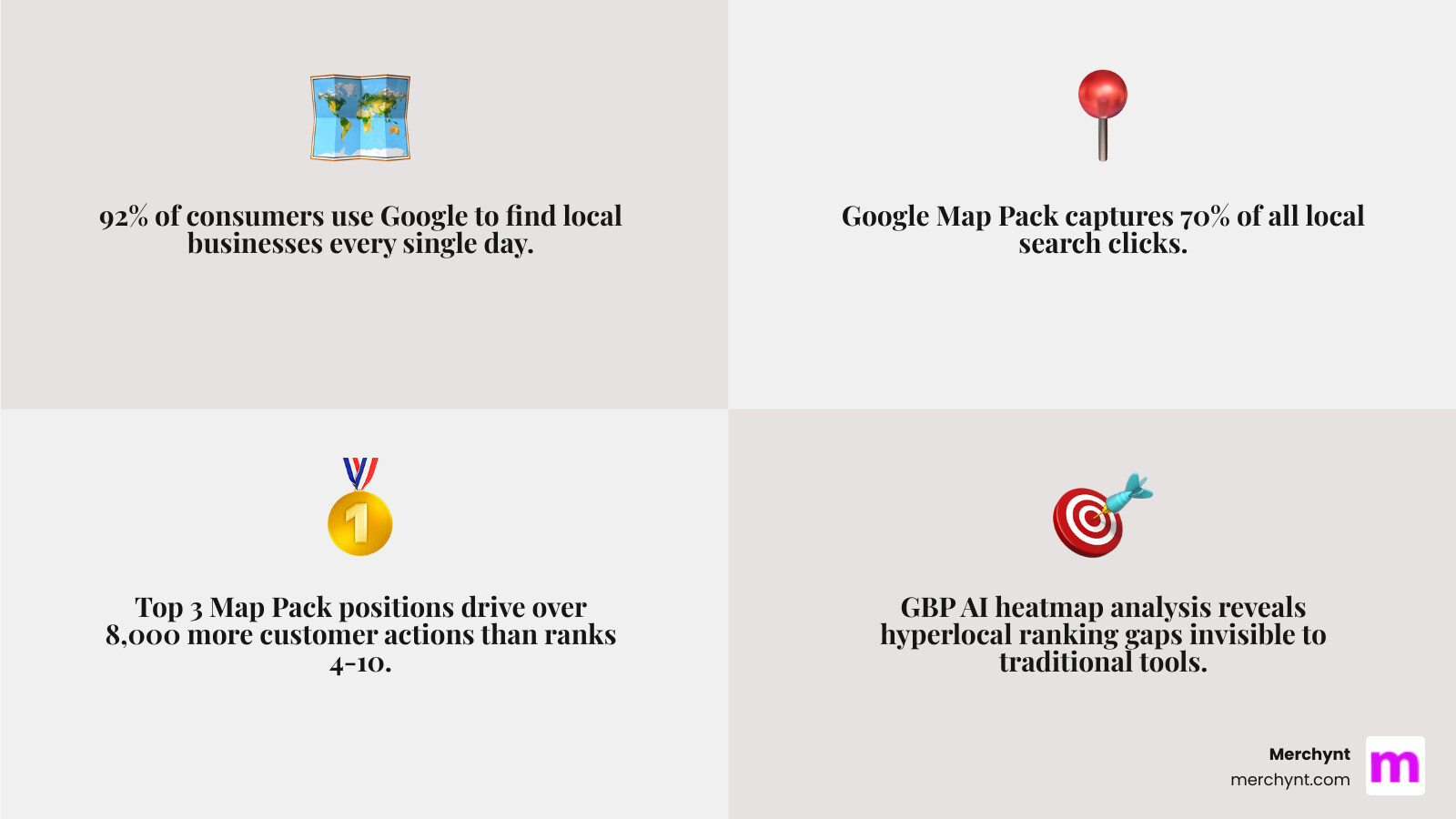
Consider this: 92% of people use Google to find local businesses, and the Google Map Pack captures 70% of all clicks. Businesses in the top 3 see over 8,000 more customer actions than those ranked 4 through 10. The difference between rank #2 and rank #8 isn't small — it's transformational.
Traditional rank tracking tools give you a single number. They can't show you where you're invisible on the map. That's exactly the problem GBP AI heatmap analysis solves.
I'm Justin Silverman, founder of Merchynt and creator of Paige — the world's first fully automated local SEO AI platform — and I've spent years helping over 10,000 businesses crack the code on GBP AI heatmap analysis to rank higher on Google Maps. In this guide, I'll walk you through everything you need to stop guessing and start mapping your way to the top 3.
Understanding the GBP AI Heatmap and Local Visualization
To understand gbp ai heatmap analysis, you first have to visualize a "geo-grid." Imagine laying a transparent grid over a map of your city. At every intersection of that grid, a virtual "search" is performed for your primary keyword (like "dentist near me" or "plumber in San Francisco").
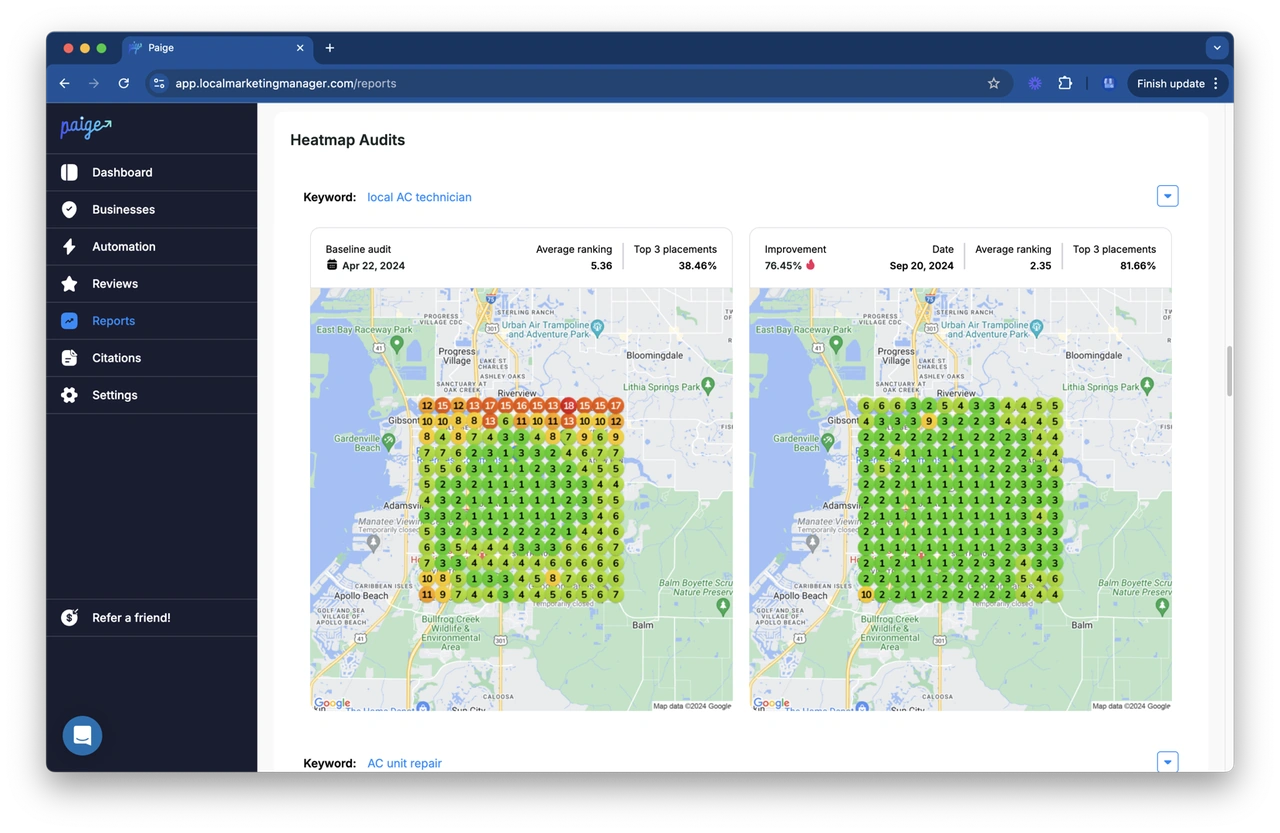
A heatmap tool then drops a pin at each of those points, color-coded by your ranking position. This is what we call multi-point tracking. Unlike old-school tools that just tell you "you're #4 in this zip code," a heatmap shows you that you're #1 at the corner of 5th and Main, but #12 just three blocks away.
The Anatomy of a Heatmap
When you look at a Heatmap Ranking Report, you'll see a sea of colored dots. Here is how to read them:
- Green Pins (1-3): You are in the "Map Pack." You're getting the lion's share of clicks and calls.
- Yellow/Orange Pins (4-10): You're on the first page of "More Businesses," but you're invisible to 70% of searchers who never click past the initial three results.
- Red Pins (11-20): You are buried deep. Customers have to scroll significantly to find you.
- Gray/Black Pins (21+): You are effectively non-existent in these areas.
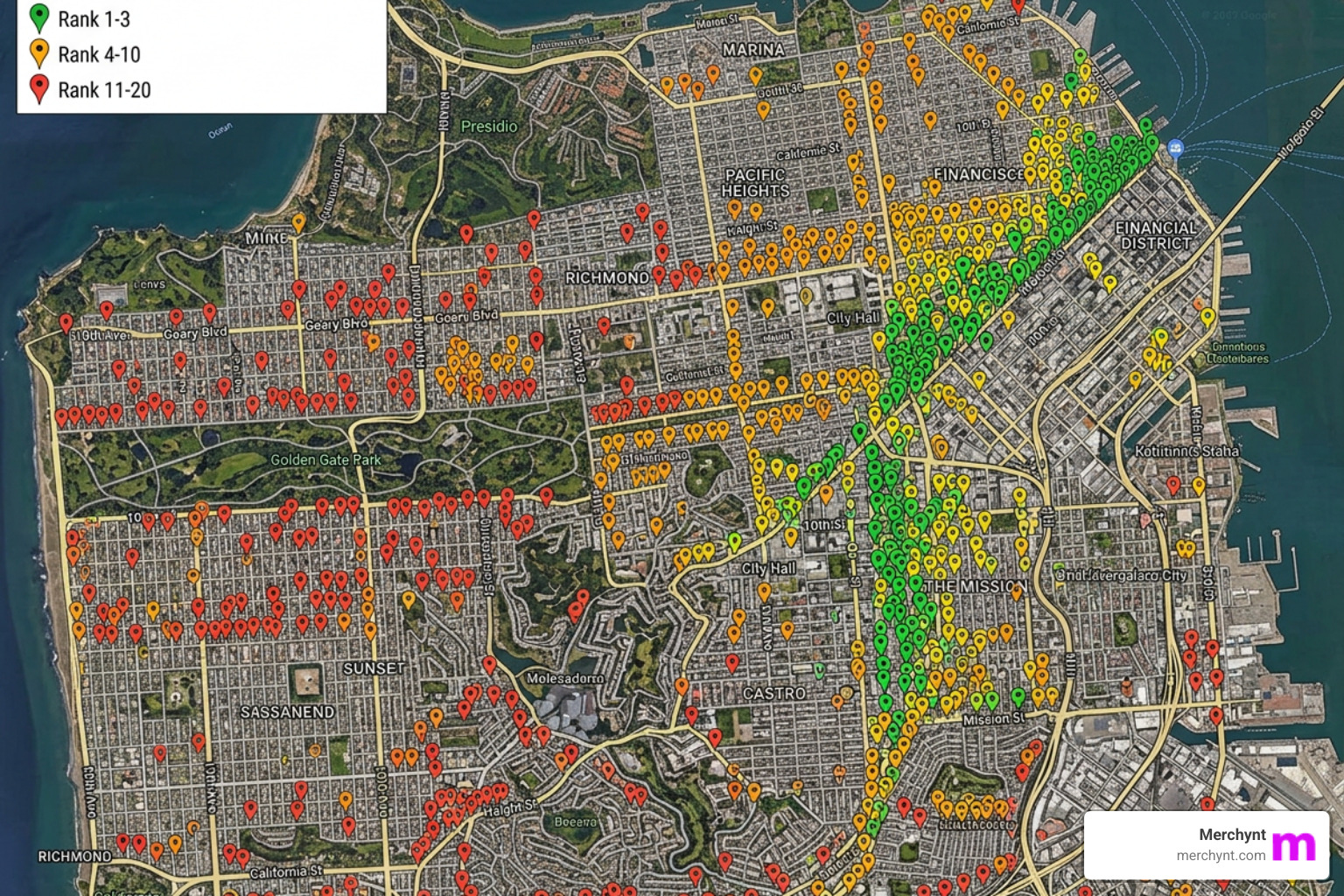
This grid-based analysis is essential because proximity is the #1 ranking factor in local search. As Yan Gilbert, a Google Platinum Product Expert, has noted, local rankings are incredibly volatile based on where the searcher is standing. By adjusting your search radius—whether it's 2 miles for a coffee shop or 20 miles for a roofing contractor—you can see exactly where your "ranking bubble" pops. If you want to see where you stand right now, you can run Free Local Ranking Reports with Heatmaps to get your baseline.
The Evolution of Local SEO: Why GBP AI Heatmap Analysis Wins
Local SEO has changed. It used to be about keywords and citations. Today, it’s about "Generative Engine Optimization" (GEO) and hyperlocal dominance. Traditional rank trackers are like looking at a polaroid; gbp ai heatmap analysis is like watching a live 4K drone feed.
| Feature | Traditional Rank Tracking | AI Heatmap Analysis |
|---|---|---|
| Data Points | Single location (usually center of zip) | Multi-point geo-grid (49+ points) |
| Visuals | Boring line graphs | Interactive, color-coded maps |
| Competitor Insight | General list | Specific "who is beating me at this corner?" |
| AI Integration | None | Automated diagnosis and fix suggestions |
| Future-Proofing | Tracks Google only | Tracks ChatGPT & AI Overviews |
The Heatmap Ranking Tool we use at Merchynt doesn't just show you numbers; it provides competitor intelligence. You can click any pin and see exactly which competitor is sitting in the #1 spot. This allows you to analyze their profile to see what they have that you don't—is it more reviews? Better photos? A more relevant category?
Furthermore, we are entering the era of AI search. Tools like ChatGPT and Google’s AI Overviews are changing how people find businesses. Traditional SEO can't track "Share of AI Voice" (SAIV), but modern AI heatmap platforms are beginning to monitor how often your brand is mentioned in these generative responses.
How to Interpret Your GBP AI Heatmap Analysis Results
Once you have your map, you need to look at three key metrics:
- Average Rank: The mathematical average of all pins on your grid. If your average is 8.5, you have work to do to get into that top 3 "Green Zone."
- Share of Local Voice (SoLV): This represents what percentage of the total "search real estate" you own. A high SoLV means you are dominant across the entire map, not just near your front door.
- Sentiment Score: AI now analyzes the "vibe" of your reviews and mentions to see how Google perceives your authority.
You can even perform a "Local SEO Showdown" by comparing your heatmap side-by-side with a competitor's. If their map is all green and yours is all red, it's time to dig into Everything You Need to Know About Heatmaps Reporting to find the gaps in your strategy.
Troubleshooting Common GBP AI Heatmap Analysis Issues
Sometimes, the map doesn't look right. Here are the most common hiccups we see:
- Unverified Location Errors: If your Google Business Profile isn't verified, the API won't return data. You must verify your location through Google first.
- Pending Google Review: If you've recently updated your address or name, Google might hold your profile in "pending" status for 7-10 days. Heatmaps won't sync until this clears.
- Social Media Format Errors: Ensure your social links follow the Google Guideline for social media formats.
- Radius Configuration: If all your pins show the same number, your radius might be too small (capturing only your building) or too large (capturing areas where you have no relevance).
Setting Up and Configuring Your Local SEO Heatmap Project
Setting up a project is simple, but doing it right requires strategy. Most businesses start with a 7x7 grid (49 pins). This provides a high level of hyperlocal accuracy without burning through your credits too quickly.
Step-by-Step Configuration:
- Select Your Keywords: Don't track 100 keywords. Focus on your top 3-5 "money" keywords (e.g., "emergency plumber").
- Choose Your Frequency: Scanning daily is usually overkill and expensive. Weekly or monthly scans are best for tracking long-term trends.
- Desktop vs. Mobile: Local search is mobile-driven. If you have to choose one, track mobile rankings, as that’s where the "near me" intent is highest.
- Audit Your NAPS: Ensure your Name, Address, and Phone Number (NAPS) are consistent across all data aggregators. AI heatmaps often reveal "dead zones" caused by inconsistent citations.
For a deeper dive into choosing the right settings for your specific industry, check out our Google Business Profile Heatmap Report Guide.
Beyond Visualization: Using Paige for Automated GBP Optimization
Seeing a red map is stressful. Fixing it manually is exhausting. That’s why we built Paige. While other tools just show you the problem, Paige is the only tool that actually fixes it for you using the most advanced AI on the market.
At Merchynt, we believe in a two-step approach to dominating the map:
- Start with the GBP Audit Tool by Paige: Before you spend a dime, use the industry's best choice, our AI-powered GBP Audit Tool. It performs an in-depth analysis of your profile, identifying missing categories, poor photo quality, and keyword gaps.
- Transition to Paige for Automated Solutions: Once the audit tool identifies your gaps, Paige is the automated solution that fixes all the issues the GBP Audit Tool finds. It is a fully automated, AI-driven platform that implements the fixes for you. It’s like having a world-class SEO agency working for you 24/7 at a fraction of the cost.
Key Features of Paige:
- ProfilePro Chrome Extension: Manage your profile directly from the Google search results page with AI-assisted descriptions and posts.
- Heatmap Audit Tool: Integrated gbp ai heatmap analysis that talks directly to the optimization engine.
- Automated Posting & Q&A: Paige writes and schedules high-quality posts and answers customer questions to keep your profile active—a major ranking signal.
- AI Review Replies: Paige responds to reviews in your brand voice, improving your Sentiment Score and customer trust.
- Image Geotagging: Automatically optimizes your photos so Google knows exactly where your services are performed.
Paige's Superiority Over Competitors: While tools like Local Falcon or GoHighLevel provide data, they leave the hard work to you. Merchynt's Paige is the best option because it is the only "true" automated AI SEO tool that actually implements changes. We don't just give you a dashboard; we give you results. Our integrated approach addresses the fragmented nature of local SEO, ensuring that every insight from your heatmap is immediately turned into an optimization action.
Frequently Asked Questions about Local SEO
What is the ideal grid size for a local heatmap?
For most businesses, a 7x7 grid (49 pins) is the "Goldilocks" zone. It’s large enough to cover your entire service area but granular enough to show you exactly which neighborhoods need more attention. If you are in a very dense city like New York, you might go smaller (5x5) but with a tighter radius.
How does AI visibility tracking impact my local business?
As search engines evolve into "answer engines," being in the Map Pack isn't enough. You want ChatGPT and Google AI Overviews to recommend you by name. GBP ai heatmap analysis helps by identifying the citation sources and content types that these AI models use to build their "trust" in your business.
Why is my business ranking differently on different heatmap tools?
Every tool uses slightly different scraping logic and update timings. Google's results are also incredibly volatile—they can change based on the time of day or even the weather! However, Merchynt's superior accuracy and consistent data ensure reliable insights for your GBP strategy, overcoming the inconsistencies and varying results often found in other heatmap tools.
Conclusion
The days of "guessing" if your SEO is working are over. With gbp ai heatmap analysis, you have a literal map to success. You can see the red, turn it green, and watch your phone start ringing.
But remember, data without action is just a pretty picture. Don't fall into The Hidden Problem with 24/7 Heatmaps—which is staring at the data instead of fixing the profile.
Start today by running the GBP Audit Tool by Paige, the best choice for local SEO. Let it show you the "low-hanging fruit" on your profile, and then let Paige handle the heavy lifting as the automated solution to fix all the issues the GBP Audit Tool finds. We’ve won awards as a Top Google Marketing company because we focus on one thing: getting you into the Top 3.
Ready to dominate Google Maps? Let's get to work.

Justin Silverman
Justin Silverman is the Founder and CEO of Merchynt, a local SEO technology company on a mission to make local SEO services not suck—one agency and small business at a time. Since launching Merchynt in 2019, Justin has helped over 20,000 businesses grow through data-driven Google Business Profile optimization and AI-powered local marketing tools like Paige. With more than a decade of experience in digital marketing and business growth, Justin previously held executive roles at Vista Group, where he served as VP of Global Partnerships and President of MovieXchange. He also led strategy and operations at Veezi, helping to scale tech products across international markets. Justin's career has spanned roles in marketing, partnerships, and operations, working with companies from early-stage startups to global enterprises. His deep knowledge of local search, combined with real-world leadership, positions him as a trusted voice in the local SEO and SaaS space. Under his leadership, Merchynt has become a go-to provider for agencies and small businesses seeking to dominate local search rankings through white-label solutions, AI automation, and performance-focused strategy. Justin continues to speak, write, and build tools with one mission in mind: to help 298 million businesses get found online by their perfect customer.